Best Household Management Apps for Families in 2026
Compare the best household management apps for families, couples and flatshares by calendar, tasks, home admin, platforms and price, and find the right fit.
Family OrganisationPick for the way your home actually runs, not for the marketing. The best household management app is the one that keeps the calendar, chores, grocery list, reminders and home admin visible to everyone who shares the home. For a free shared calendar and basic lists, choose Cozi. For school email parsing and meal planning, Maple. For a text-only AI assistant you talk to like a person, Ollie. For a build-it-yourself system, Notion. If you want one app that handles the whole household, the schedule, the tasks, the shopping and the home admin like warranties and documents, with a natural-language assistant that understands plain language, that is OneHaus.
Household management is bigger than a family calendar
Most "family organiser" apps solve one slice of the problem: a colour-coded calendar, or a chore chart, or a shopping list. Household management is the whole thing. It is running a home, the schedule, the tasks, the shopping, and the slow-burn admin like appliance warranties, car servicing, pet records and important documents, for everyone who shares that home.
That breadth matters, because a household is not only a family with young children. It is also a couple coordinating two careers, two flatmates splitting bills and cleaning, or a multi-generational home where several adults need the same information. The job is the same in every case: stop one person carrying the entire mental load, which research from the University of Bath found still falls disproportionately on one partner (mothers handle 71% of household mental-load tasks), and stop the household drifting back to a group chat where nothing gets tracked. Very few apps cover that full span in one place, most are strong on calendar or strong on lists, then leave home admin to a drawer of receipts.
We checked each app against the same broad job: schedule, tasks, shopping and home admin in one place. Pricing was last checked in June and July 2026, and each app links to its source.
The apps
OneHaus
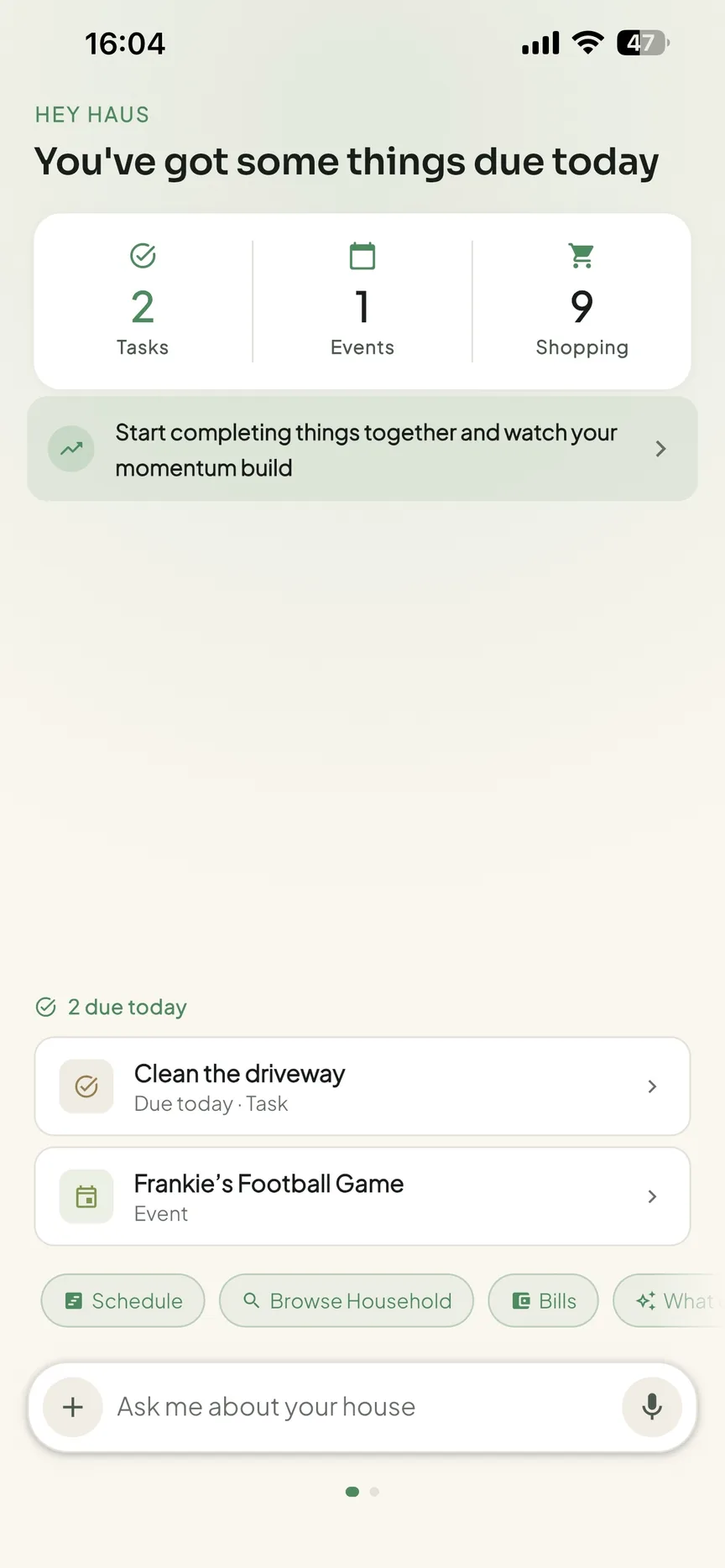
OneHaus is a household management app for families and shared households alike. It pulls the whole home into one place: tasks, a shared calendar, shopping lists, recipes, home inventory and a natural-language assistant.
Tasks support recurring schedules and automatic rotation between household members, so the jobs nobody wants move around fairly without anyone reassigning them by hand. The shared calendar syncs with both Apple Calendar and Google Calendar, shopping lists sync across your devices and sort themselves by aisle, and recipes let you save meals and drop the ingredients straight onto a list.
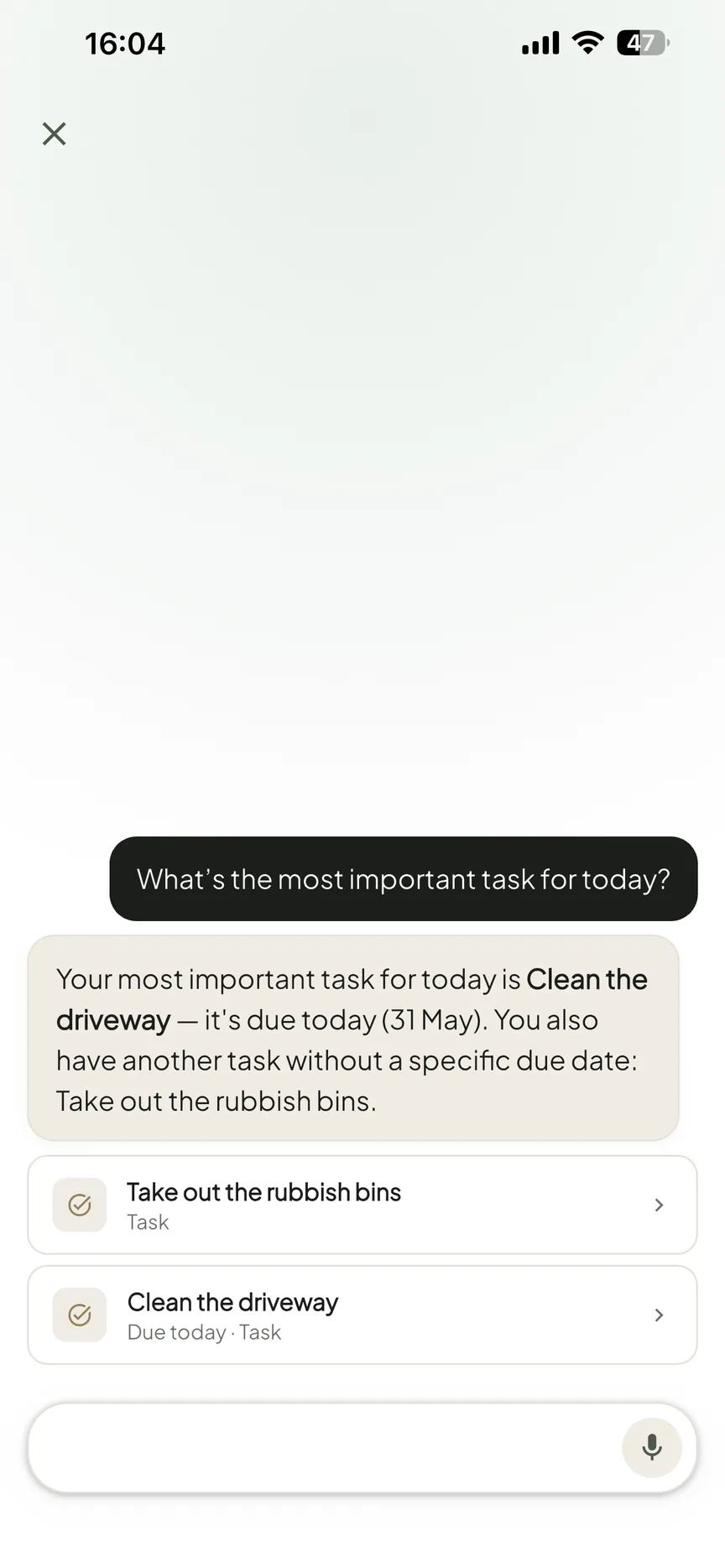
Where it goes beyond a typical organiser is home admin. The home inventory tracks appliances, vehicles, pets, warranties and important documents in the same app you use for daily tasks, so the boring-but-expensive stuff stops living in a drawer. The assistant understands natural language, so you can say "add milk to the shopping list" or "book a boiler service for next Tuesday" without tapping through a form. Use it on iPhone, iPad, Apple Watch and Android, or through connected AI assistants via MCP. It is privacy-first and ad-free, with a 30-day free trial, after which a single paid household subscription covers everyone rather than charging per person.
Best for: any shared home, couples, flatmates or families, that wants the schedule, tasks, shopping and home admin in one app with a natural-language assistant and connected AI assistants via MCP. See OneHaus for shared households.
Cozi
Cozi is a long-running family organiser built around a shared colour-coded calendar, shopping lists and to-do lists. It has been going for well over a decade and reports more than 20 million registered users.
The calendar is its strongest feature and the reason most people stay, while lists and to-dos cover the basics. The catch is the free tier: free users only get calendar access for the next 30 days, a limit introduced in 2024, and the app is ad-supported. Cozi Gold removes the ads and unlocks full calendar access, month view, calendar search and a birthday tracker, with a newer Cozi Max tier adding some AI.
There is no home inventory, no warranty or document tracking, and no chore rotation. It is a calendar-and-lists app, not a whole-home one. Available on iOS, Android and web. Free with adverts and a 30-day calendar limit, or $39/year for Cozi Gold, with Cozi Max at $79/year (Cozi's plan comparison, checked July 2026). If Cozi's limits are the reason you're here, our Cozi alternatives roundup goes deeper on what to switch to.
Best for: households that mainly need a shared calendar and simple lists, and don't mind paying to remove the free-tier limits.
FamilyWall
FamilyWall is an all-in-one family hub that leans hard into communication and location. Alongside a shared calendar, lists and tasks, it bundles private family messaging and real-time location sharing, which is what sets it apart.
On a paid plan it adds a meal planner, Google and Outlook calendar sync, a budget tracker, document sharing and a larger storage allowance. As a French company it is GDPR-compliant and states it does not sell user data. The downsides reviewers flag most are a dense, busy interface and occasional sync issues with external calendars, and the free tier has limited storage and no calendar sync.
Home admin is partly there through document storage, but there is no structured inventory for appliances, vehicles, warranties or pets, and no AI assistant. Available on iOS, Android and web. Free tier available, or Premium at $4.99/month or $44.99/year after a 30-day trial (FamilyWall Premium, checked June 2026).
Best for: households where in-app messaging and live location sharing are must-haves.
Maple
Maple is a family assistant that has carved out a niche around a shared family inbox. It connects to your email, then uses AI to turn school updates, bills and invitations into calendar events and to-dos automatically, which is a genuinely clever way to cut typing.
It also covers a shared calendar with multiple views, a compare-schedules feature, chores, meal planning with smart shopping lists, and shared notes. The calendar syncs with Google, Apple iCal and Outlook, and unusually the free tier includes one calendar integration. Maple Plus removes ads and adds calendar view customisation, multi-calendar syncing and an expense sheet.
The trade-off is that it is ad-supported on the free tier and very much family-shaped: the inbox-parsing pitch assumes school emails and a parenting context, so it is a looser fit for a couple or a flatshare, and there is no structured home inventory for warranties and appliances. Available on iOS, Android and web. Free with ads, or a paid Maple Plus tier priced in-app after signup (Maple does not publish a price on its own site, checked July 2026).
Best for: families drowning in school and admin emails who want them turned into events automatically.
Ollie
Ollie is the outlier here: there is no app to open. You text it like a person over iMessage or SMS, and it handles the household from inside your messages. It started as a meal planner and grew into a broader family AI assistant.
Once connected, it can read and write your Google or Apple calendar, scan Gmail for school emails, manage reminders and lists, send daily briefings and plan meals, and you can add the household to a group chat so everyone shares the same assistant. The flip side is that text is the only channel: there is no calendar grid to glance at, no list view to scan, and no structured home inventory. Email scanning is Gmail-only, so Microsoft 365 households lose that feature.
Pricing is message-based rather than feature-based: the free tier gives 50 messages a month plus a few extra each day, and paid tiers raise the allowance. Available wherever you can text, on iOS and Android. Free tier available, with Everyday at $25/month and Always-On at $100/month (Ollie pricing, checked June 2026).
Best for: people who want to manage the home entirely through text and never open another app.
Notion
Notion is a flexible workspace of documents and databases that plenty of people bend into a home management system. It is not a household app, but the template marketplace is full of ready-made home setups.
The power is real: you can build a chore tracker, a home inventory with warranty dates, a vehicle log and a shared family wiki in one workspace, and AI features on paid plans can summarise and generate content. The cost is time and money. Nothing works out of the box, so you spend an evening or two building or customising a template, per-seat pricing adds up fast, and there is no real-time aisle-sorted shopping list, no chore rotation and no native calendar sync without workarounds.
Available on iOS, Android, desktop and web. There is a free personal plan; the Plus plan is $10/user/month, so a four-person household runs to roughly $480/year (Notion pricing, checked June 2026).
Best for: people who enjoy building their own system and will invest the setup time.
Feature comparison
| Calendar | Tasks | Shopping | Home admin | AI | Platforms | |
|---|---|---|---|---|---|---|
| OneHaus | Apple + Google sync | Strong (with rotation) | Yes (aisle-sorted) | Inventory, warranties, vehicles, pets, documents | Natural language | iPhone, iPad, Apple Watch, Android, AI assistant |
| Cozi | Shared (30-day limit free) | Basic | Yes | No | Limited (Max tier) | iOS, Android, web |
| FamilyWall | Sync on paid plan | Yes | Yes | Documents only | No | iOS, Android, web |
| Maple | Google + Apple + Outlook | Yes (chores) | Yes (smart lists) | No | Email-to-event | iOS, Android, web |
| Ollie | Read/write sync | Reminders | Yes | No | Conversational (text) | iOS, Android (SMS) |
| Notion | DIY | DIY | DIY | DIY | Yes (paid) | iOS, Android, desktop, web |
How to choose
Name the part of running your home that creates the most friction, then pick for that:
- A shared calendar and simple lists are enough. Cozi covers this well, as long as you are comfortable paying to lift the 30-day free limit.
- Messaging and live location matter most. FamilyWall bundles in-app chat and real-time location that the others leave to your phone's built-in family sharing.
- School and admin email is the bottleneck. Maple turns inbox clutter into events and tasks automatically, which is its real strength.
- You never want to open an app. Ollie lives in your messages, so the whole household coordinates by text.
- You love building your own system. Notion can model almost anything, if you will spend the time and the per-seat cost.
- You want the whole home in one place. Schedule, tasks, shopping and home admin like warranties and documents, with a natural-language assistant, is exactly where OneHaus fits, for couples and flatshares as much as families.
A quick word on the build-a-stack approach. Some guides suggest pairing a calendar app with a separate shopping app and a separate inventory tool. That can work, but every extra app is another login to remember and another place where something gets added in the wrong spot. The more apps in the stack, the faster a shared household drifts back to the group chat. An all-in-one tends to be the thing that actually gets used, because there is only one place to look.
If you already live inside a work task manager, extending Todoist to household tasks is a reasonable middle ground; our shared to-do list app guide covers it alongside the other options. If shopping and recipes are genuinely your only friction, a dedicated app like AnyList does that one job very well, covered in our grocery list app roundup.
Households this comparison doesn't fully cover
A few common needs sit outside the six apps above, worth flagging so you choose with open eyes:
- Separated or blended families. None of these apps is purpose-built for co-parenting across two homes with custody schedules and shared expense splitting. If that's your situation, a dedicated co-parenting app will serve you better than a general organiser.
- Location sharing for teens. Beyond FamilyWall, most general organisers leave live location to your phone's built-in family sharing. If that matters most, pair your organiser with Apple or Google family sharing rather than expecting it from the app.
- Gamifying chores for younger kids. If points and rewards are what get children involved, a kid-focused chore app like the ones in our best family chore apps roundup adds motivation these broader tools don't.
What changed in this July refresh
This page now answers the exact comparison search more directly: what the best household management app is, who each option suits, and when a family calendar is too narrow. Google Search Console showed new impressions for household management app, household management apps and household management app for couples, all with no clicks, so the refresh tightens the opening answer, adds clearer platform and pricing language, and strengthens the couple and flatshare fit without changing product claims.
Frequently asked questions
What is the best household management app in 2026?
For most shared homes that need more than a calendar, OneHaus is the best household management app because it combines shared tasks, recurring chores, calendar, grocery lists, recipes, inventory, warranties and documents in one place. There is still no single winner for every household, because the best app depends on how your home runs. Cozi is the best free shared calendar, FamilyWall is best for messaging and location, Maple is best for turning school email into events, Ollie is best if you want to manage everything by text, and Notion is best for people who like building their own system. If you want the schedule, tasks, shopping and home admin like warranties and documents in one app with a natural-language assistant and connected AI assistants via MCP, OneHaus is built for that across families and shared households.
What is the difference between a household management app and a family calendar?
A family calendar shows who is doing what and when. A household management app does that and also handles the tasks, the shopping and the home admin, things like appliance warranties, car servicing, pet records and important documents, that keep a home running. Calendar apps solve the schedule; household apps aim to solve the whole home, which is why they suit couples and flatshares as well as families.
Is there a household management app for couples or roommates, not just families?
Yes. Household management is about any shared home, not only families with children. OneHaus works for couples and flatshares because it focuses on the shared jobs, the calendar, the chores, the shopping and the home admin, and rotates recurring tasks fairly between whoever lives there. A single household subscription covers everyone, so flatmates and partners are not billed per person.
Which household management app handles home admin like warranties and documents?
This is where most organisers stop. OneHaus includes a home inventory for appliances, vehicles, pets, warranties and documents alongside daily tasks. FamilyWall offers document storage on a paid plan, and Notion can model home admin if you build it yourself, but neither gives you a structured inventory out of the box. Cozi, Maple and Ollie focus on calendar, lists and email rather than home records.
Are household management apps worth paying for?
For a single shared home, usually yes, because the cost of a missed appointment, a lapsed warranty or a skipped car service is higher than a subscription. The thing to watch is how you are billed. Per-seat apps like Notion get expensive for a four-person household, whereas a household subscription such as OneHaus covers everyone for one price. Free tiers like Cozi's now carry real limits, so check what the free version actually includes before relying on it.
Which to pick
If your home only needs a shared calendar, Cozi will do. If your bottleneck is school email, Maple is clever, and if you want to run everything by text, Ollie is genuinely different. But if you are trying to run the whole household, the schedule, the tasks, the shopping and the home admin, from one place, and you would rather talk to a natural-language assistant than tap through forms, that is what OneHaus is built for, whether you are a family, a couple or a flatshare.
Start your 30-day free OneHaus trial and add your first shared task in under a minute. One paid household subscription then covers the whole household, on iPhone, iPad, Apple Watch and Android, plus connected AI assistants via MCP. For more on how it fits a shared home, see OneHaus for shared households, or compare it head to head with Cozi, FamilyWall, Maple and Ollie.