Ollie AI Has Shut Down (2026): OneHaus as an Ollie Alternative
Ollie has shut down. In a farewell letter, Ollie said it was "sunsetting on Nov 6, 2026". Ollie said it would text each user an export of their data, and subscriptions to Ollie and Ollie for Meals are cancelled with a refund for any partial or unused months. The letter gives no reason. If your household ran on Ollie, this page covers what you had, what OneHaus does in its place, and what it does not. Checked November 2026.
What was Ollie?
Ollie was an AI assistant for families that you talked to over text. There was no app for the assistant. You added Ollie to an iMessage or SMS group with your partner, linked your calendar, and messaged it like a person. It started as a meal-planning product and grew into a wider family assistant, with a separate iOS app called Ollie for Meals.
Ollie watched your Google and Apple calendars, read Gmail for school and activity emails, kept reminders and to-do lists, and sent a daily briefing with the weather, the day's schedule and what was for dinner. Pricing was metered by message, with a free daily allowance and paid plans for heavier use.
What happens to your Ollie data
Three things from the farewell letter matter if you used Ollie:
- Your data comes by text. "Ollie will text you an export of your data." Check your messages for it and keep it. It is the only copy Ollie says it will send.
- Billing stops. Subscriptions to Ollie and Ollie for Meals are cancelled, with a refund for any partial or unused months.
- Your calendar is still yours. Ollie read and wrote to your own Google or Apple calendar, so the events it added are in that calendar, not in Ollie.
The letter does not say when Ollie deletes what it holds.
Moving your household to OneHaus
OneHaus is a household app on iPhone, iPad, Apple Watch and Android. It has tasks with rotation, a shared calendar, shopping lists sorted by aisle, meal planning and recipes, home inventory, and an assistant called Ask OneHaus that takes plain language. There is no direct import from Ollie, but most of what Ollie held can come across without retyping:
- Start a household and invite the people from your Ollie group. Everyone joins with an invite code, and one household subscription covers all of you after the 30-day trial.
- Bring your calendar across. In onboarding, tap Choose events from my calendar and pick what the household should see. Or turn on device calendar sync both ways, so OneHaus reads the Google or Apple calendar Ollie used.
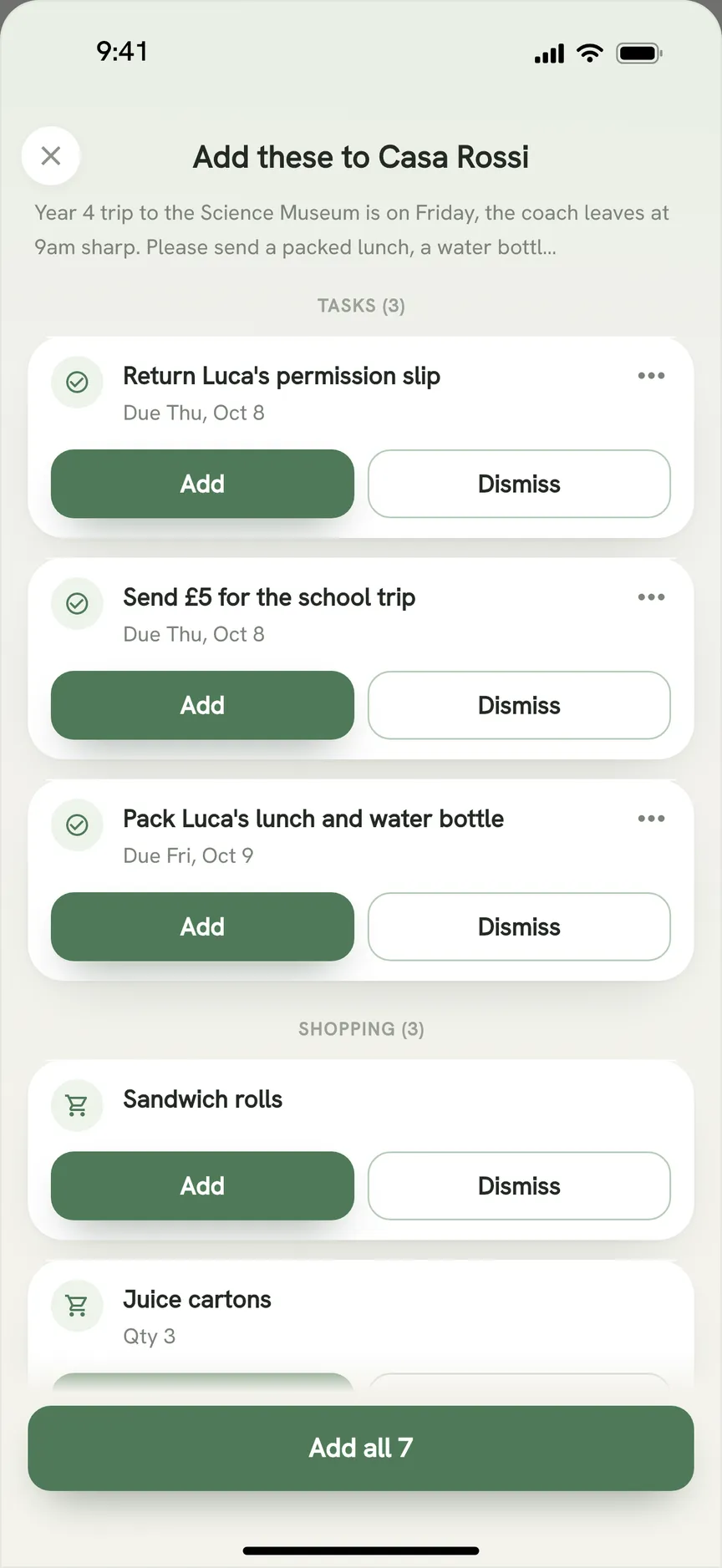
- Share the export into OneHaus. Open the message or link Ollie sent, tap Share and pick OneHaus. It reads the text and proposes tasks, events, shopping items and contacts for you to accept or dismiss. Very long text is trimmed, so share a long export in a few parts.
- Connect the inbox Ollie read. OneHaus can connect a Gmail, iCloud, Yahoo, Outlook or other inbox and suggests events, tasks, contacts and bills from it for you to review.
- Move your meals. Save the recipes you used in OneHaus and plan the week from them. A recipe's ingredients go onto the shopping list in one tap.
Sharing into OneHaus, the inbox, meal planning and connected AI assistants are part of OneHaus Pro, which every new household gets free for 30 days.
What OneHaus does not replace
There is no texting. Ollie lived in your messages. OneHaus is an app. You can type or speak to Ask OneHaus inside it, and OneHaus Pro connects your household to ChatGPT, Claude and other assistants, so you can ask "what's on this weekend?" from a chat you already use. But nobody in the household can add OneHaus to an SMS group.
There is no morning briefing. Ollie sent the day's plan unprompted. OneHaus shows today's events, tasks and bills on its home screen and in widgets, and sends reminders, but it does not text you a summary each morning.
It is not a meal planner first. Ollie started as one, and Ollie for Meals was a dedicated app. OneHaus plans meals from your saved recipes and its Discover collection, but you choose the meals. It does not draft a week of dinners for you on its own.
Ollie compared with OneHaus
| Feature | Ollie (closed 6 Nov 2026) | OneHaus |
|---|---|---|
| How you used it | Text thread (iMessage or SMS), no app | Native app on iPhone, iPad, Apple Watch and Android, plus connected AI assistants |
| Calendar | Read your Google and Apple calendars | Shared calendar that syncs with the calendar on your phone |
| Read Gmail for school emails | Connects an inbox and suggests events, tasks, contacts and bills | |
| Tasks and chores | Reminders and to-do lists by chat | Tasks with recurring schedules and rotation |
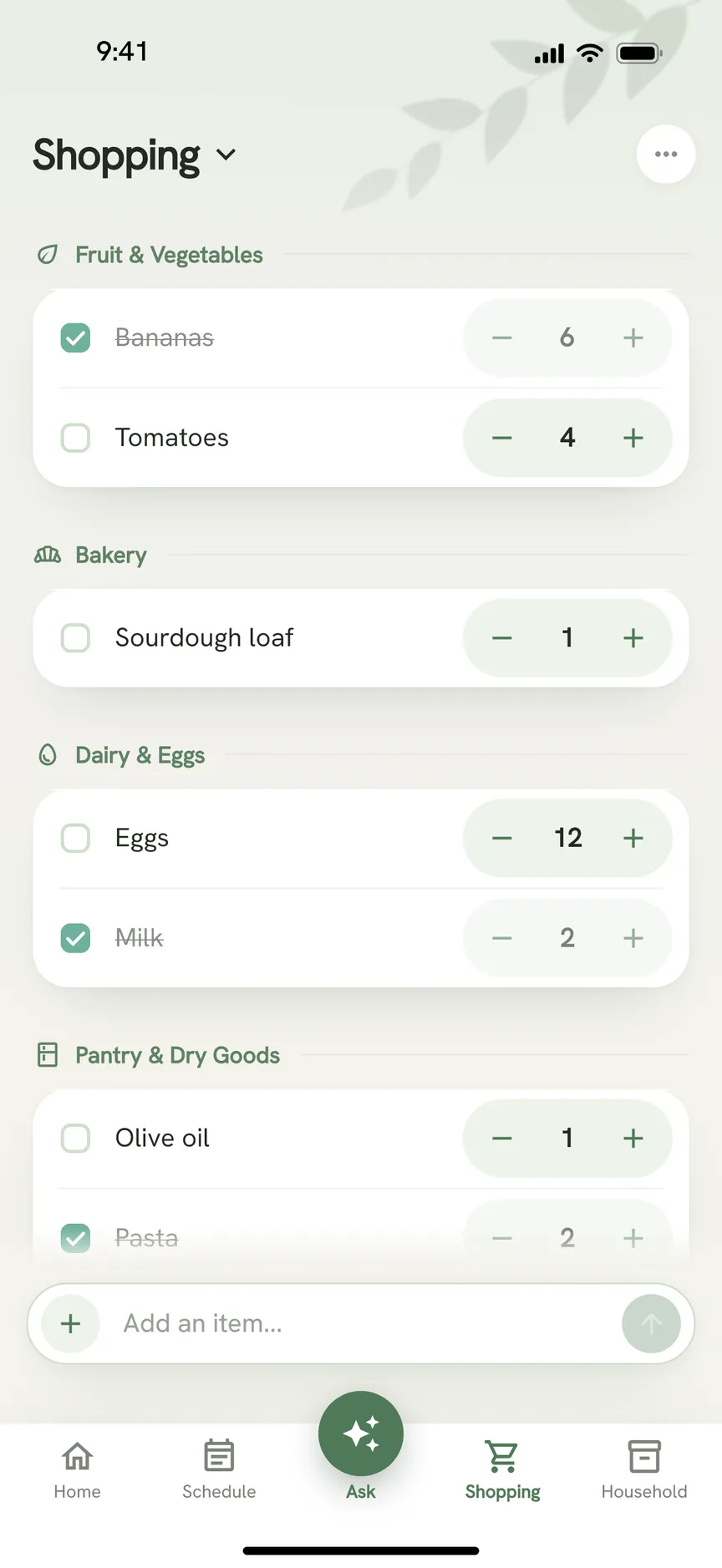
| Shopping lists | By chat | Lists shared across devices, sorted by aisle |
| Meals | By chat, plus the Ollie for Meals app | Meal planning and recipes, ingredients sent to the list |
| Home inventory | None | Appliances, vehicles, pets, warranties and documents |
| Daily briefing | Yes, by text | No; home screen, widgets and reminders instead |
| Pricing | Metered per message | One household subscription after a 30-day trial |
What you gain by moving
A text thread answers in the moment, then scrolls away. OneHaus keeps a record you can open later. The shopping list stays sorted by aisle, every appliance warranty sits next to its expiry date, and each car's service history is in one place. When we ran both side by side in June, that was the clearest split. Ollie was quicker for "what's on Thursday", but only OneHaus gave us a list we could come back to.
Chores also rotate. Ollie could remind someone, but it never decided whose turn it was. OneHaus cycles recurring jobs between household members once you set them up.
And pricing stops depending on how much you talk. Ollie charged by the message, so a busy week cost more. OneHaus is one subscription for the household, whatever you ask it.
Other Ollie alternatives
OneHaus suits households that want one app for the calendar, chores, shopping, meals and home records. If you only used Ollie for one job, a narrower app may fit better. Our Ollie alternatives guide compares the options, including apps that pull dates out of email and WhatsApp into the calendar you already have.
Frequently Asked Questions
Is Ollie shutting down?
Ollie has already closed. Its farewell letter says Ollie was "sunsetting on Nov 6, 2026". Ollie for Meals subscriptions were cancelled along with the assistant.
How do I get my data out of Ollie?
Ollie said it would text you an export of your data, so check your messages for it and keep it. You can share its text into OneHaus, which proposes tasks, events, shopping items and contacts from it for you to review.
Will I get a refund from Ollie?
The farewell letter says billing is cancelled and you "will receive a refund for any partial or unused months" for Ollie or Ollie for Meals.
Is there an AI family assistant like Ollie that works by text?
Not in OneHaus. It is an app, though OneHaus Pro connects your household to ChatGPT, Claude and other assistants, so you can manage it from a chat app you already use. Our Ollie alternatives guide covers the other options.
What happens to the events Ollie added to my calendar?
They stay. Ollie wrote to your own Google or Apple calendar, so those events belong to that calendar. OneHaus can read them through device calendar sync set to Both ways.
Try OneHaus Free
If Ollie ran your household, OneHaus is the app that takes over its calendar, lists, chores and meals, and adds home records Ollie never kept. It is free to download on iPhone, iPad, Apple Watch and Android, with 30 days of OneHaus Pro to bring everything across. If you have questions about moving off Ollie, get in touch.