OneHaus vs FamilyWall (2026) | Best FamilyWall Alternative
FamilyWall is a family organiser with a calendar, lists, location sharing, and a family journal. OneHaus is a household manager with home inventory, an AI assistant, and no location tracking of any kind. If you want depth on running the house rather than watching where everyone is, OneHaus is the stronger fit. In September 2026 we read FamilyWall's own plan chart, its Premium support article, and its App Store listing line by line, because those three pages do not entirely agree with each other.
What is FamilyWall?
FamilyWall is a family organisation app built around keeping family members connected and coordinated. It covers a wider social and safety remit than most household apps, mixing scheduling with location tracking and shared media.
The shared calendar is colour coded per family member. Shopping lists and to-do lists cover basic household coordination, and to-dos can be assigned to children or other members. A built-in messenger and a contact book round out the free side of the app.
Where FamilyWall differentiates itself is the family locator, which uses GPS to show each member's position on a map, plus Place Alert for arrival and departure notifications. Shared photo albums and a family journal give households somewhere to keep memories. Location sharing is opt-in per person.
What FamilyWall's free plan actually includes
This is the part worth reading carefully, because the free plan is thinner than the marketing suggests. FamilyWall's plan chart lists the same 15 rows under both columns and strikes through the ones the free plan does not get. Checked in September 2026, the free plan keeps five: shared calendar, shopping lists, to-do lists, messenger, and contact book.
The other ten are struck through on the free plan, which means they are Premium only:
- Ad free, so the free plan carries advertising
- Documents
- Budget Tracker
- Meal Planner
- Recipe Box
- Timetable
- Family Locator
- Place Alert
- Google and Outlook.com calendar sync
- Quick Grocery List
That settles a question we left open in an earlier version of this page. The family locator is not free. FamilyWall's Premium support article agrees, describing "Enhance Location" as a Premium feature, and its App Store listing puts the locator and arrival and departure notifications under the Premium heading too.
One caveat on that chart. FamilyWall's App Store listing puts recipes under free features while the website strikes Recipe Box off the free plan, so check in the app before you count on it.
FamilyWall pricing in 2026
FamilyWall Premium is $4.99 per month or $44.99 billed annually, after a 30-day free trial. The App Store listing quotes a higher $7.99 per month for the US with the same $44.99 per year, so the annual price is the one both sources agree on. Premium covers the whole family rather than one account, applies to the first five circles, and includes 25 GB of storage plus audio and video messaging.
The app itself is well liked. It holds 4.8 stars from 22,746 App Store ratings and 4.8 on Google Play, and the current release, version 2026.8.4, shipped on 26 August 2026. It needs iOS 17 or later.
What is OneHaus?
OneHaus is an AI-powered household management app for households that need more than a shared calendar and a couple of lists. It brings tasks, a shared calendar, named shopping lists, home inventory, and an AI assistant into one app.
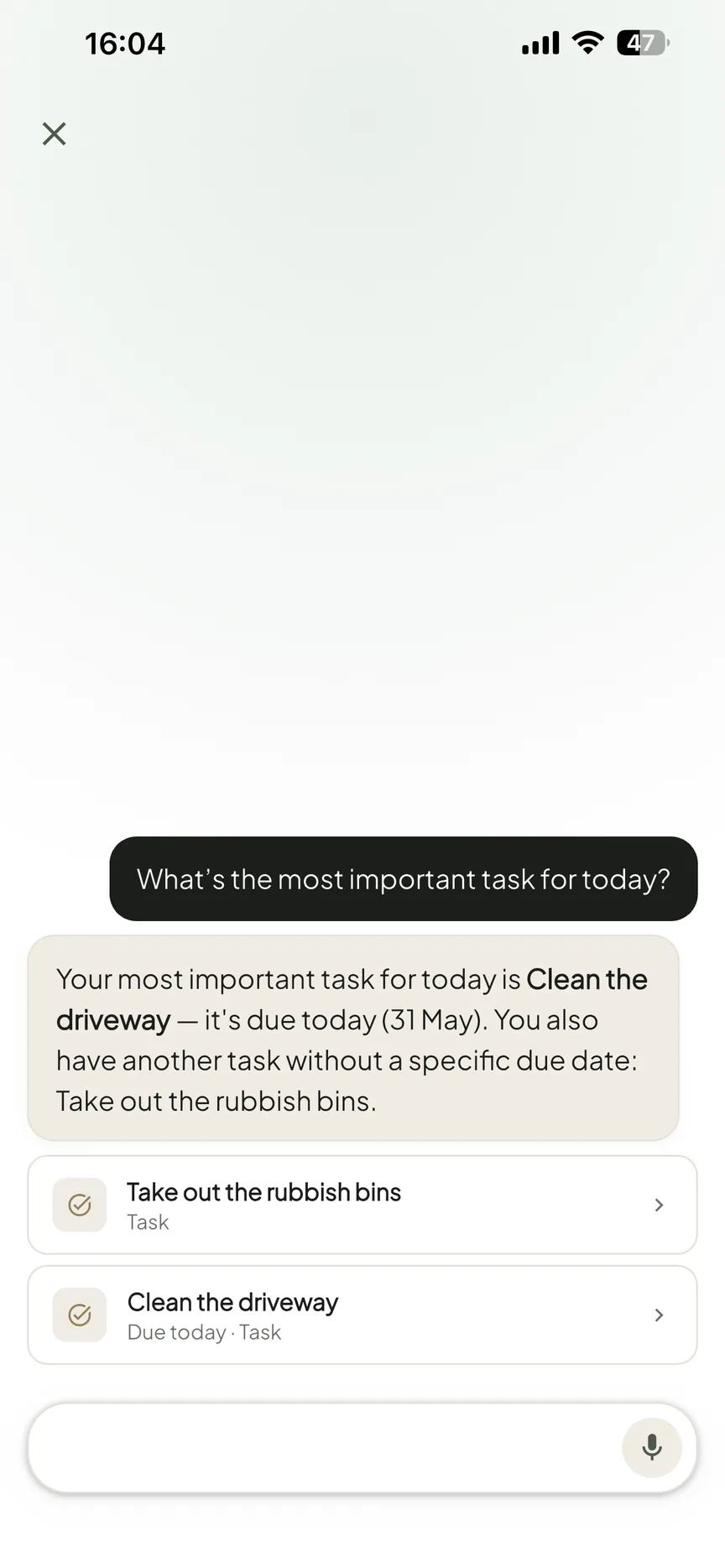
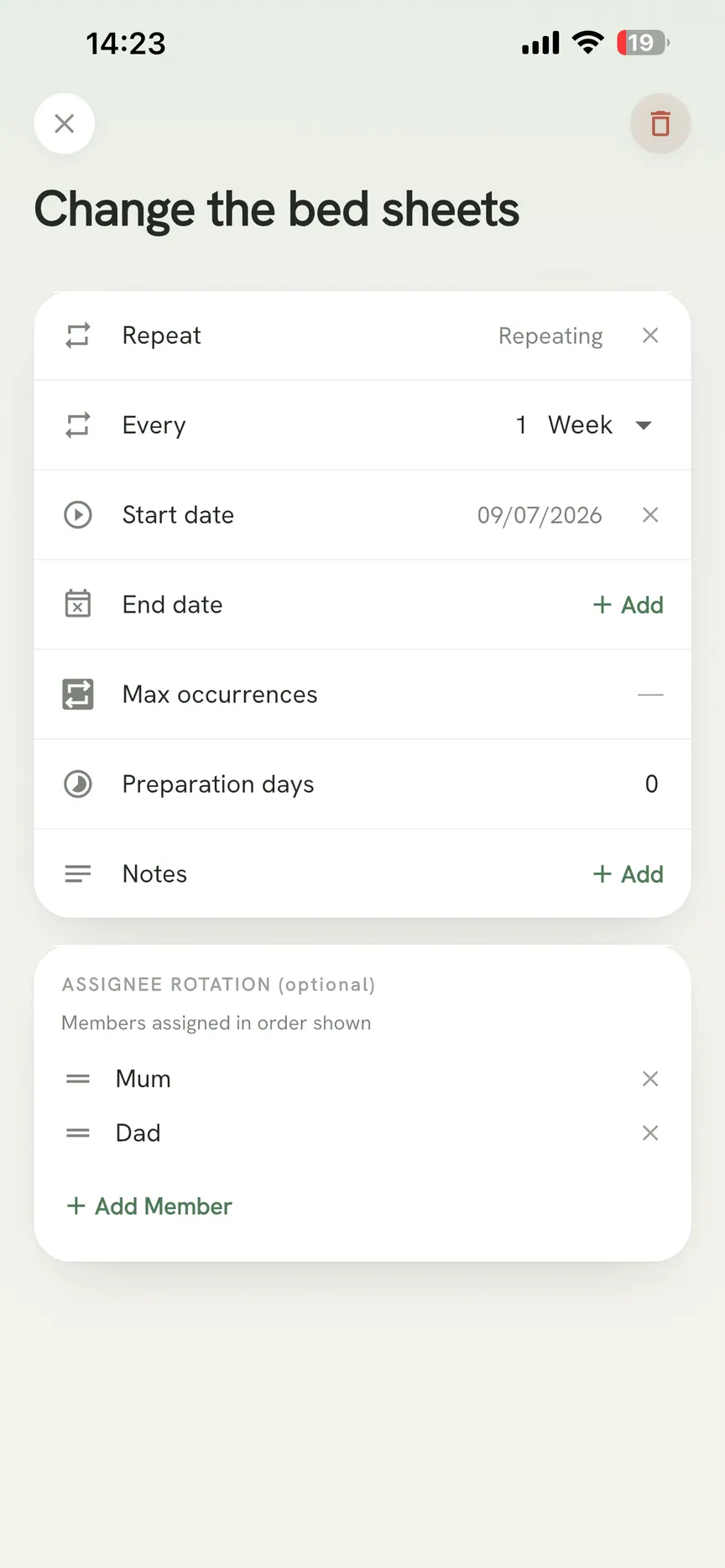
Repeating tasks in OneHaus take an ordered assignee rotation, so chores cycle through household members automatically instead of being reassigned by hand every week. The AI assistant lets you add tasks, shopping items, and calendar events in plain language rather than through forms. Home inventory logs the things around the house along with warranties, documents, and expiry dates.
Shopping lists are named, and a house can keep up to 20 of them. On Apple Watch, the list picker appears once you have more than one and remembers which one you were using.
OneHaus runs on iPhone and iPad (iOS 18 or later), Apple Watch, and Android. There is no web app, so this is a phone-first tool. You can also connect it to ChatGPT or Claude and manage the house from there. New households get a 30-day free trial, after which OneHaus Pro is a paid subscription through the App Store or Google Play.
Feature comparison
| Feature | FamilyWall | OneHaus |
|---|---|---|
| Shared calendar | Yes, on the free plan | Shared household calendar |
| Calendar sync | Google and Outlook sync, Premium only | Device calendar sync, one way by default, Both ways is an opt-in setting |
| Tasks and chores | To-do lists with assignment, free | Tasks with scheduling and repeats |
| Chore rotation | Not available | Repeating tasks rotate through an ordered list of members |
| Shopping lists | Yes, on the free plan | Up to 20 named lists, synced, with an Apple Watch picker |
| Meal planning | Premium only | Meal plans and recipes, including a Discover recipe library |
| Home inventory | Not available | Appliances, vehicles, pets, documents, warranties, and expiry dates |
| AI assistant | Not available | Built in, plus connect ChatGPT or Claude to your house |
| Location sharing | GPS family locator and Place Alert, Premium, opt-in per person | Not available, by design |
| Family journal and photos | Shared albums and journal | Not available |
| Advertising | Free plan shows ads, Premium is ad free | No ads on any plan |
| Platforms | iOS 17+, Android, and any web browser | iPhone and iPad (iOS 18+), Apple Watch, Android. No web app |
| Pricing | Free plan; Premium $4.99/month or $44.99/year after a 30-day trial | 30-day free trial, then OneHaus Pro |
Key differences
Location tracking versus a design with no location at all
The biggest difference between these two apps is what they do with location data.
FamilyWall's locator is a headline Premium feature. Real-time GPS lets parents see where children are, Place Alert fires when someone arrives at or leaves a saved place, and location history covers where people have been. For families with younger children or teenagers, that is a real safety feature and it is the main reason to pay.
In our own testing the locator worked, but the map pin lagged behind real movement and occasionally placed us a street or two off before catching up, and the phone running it drained noticeably faster on a normal day out. FamilyWall says as much itself. Its App Store listing carries the disclaimer that "Continued usage of location services while the app is in the background can excessively drain the battery." The independent review at the Educational App Store rates the locator as a genuine strength while flagging that the sheer breadth of features takes a while to set up. If you turn the locator on, treat its position as roughly right rather than accurate to the metre.
OneHaus takes the opposite position. There is no location tracking in OneHaus, no locator to enable, and no place alerts. Household data stays in the app and is not used for advertising.
AI assistance
FamilyWall has no AI assistant. Adding an event, a task, or a shopping item means opening the right section, filling in a form, and saving.
OneHaus lets you describe what you need instead. "Add pasta and olive oil to the shopping list" or "schedule a boiler service for April" creates the item without navigating menus. You can send it a photo or share a message into the app and let it pull the details out. And because OneHaus connects to ChatGPT and Claude, you can ask about the house from whichever assistant you already use.
Home inventory
FamilyWall is built around people and their schedules. There is nowhere in it to record what you own.
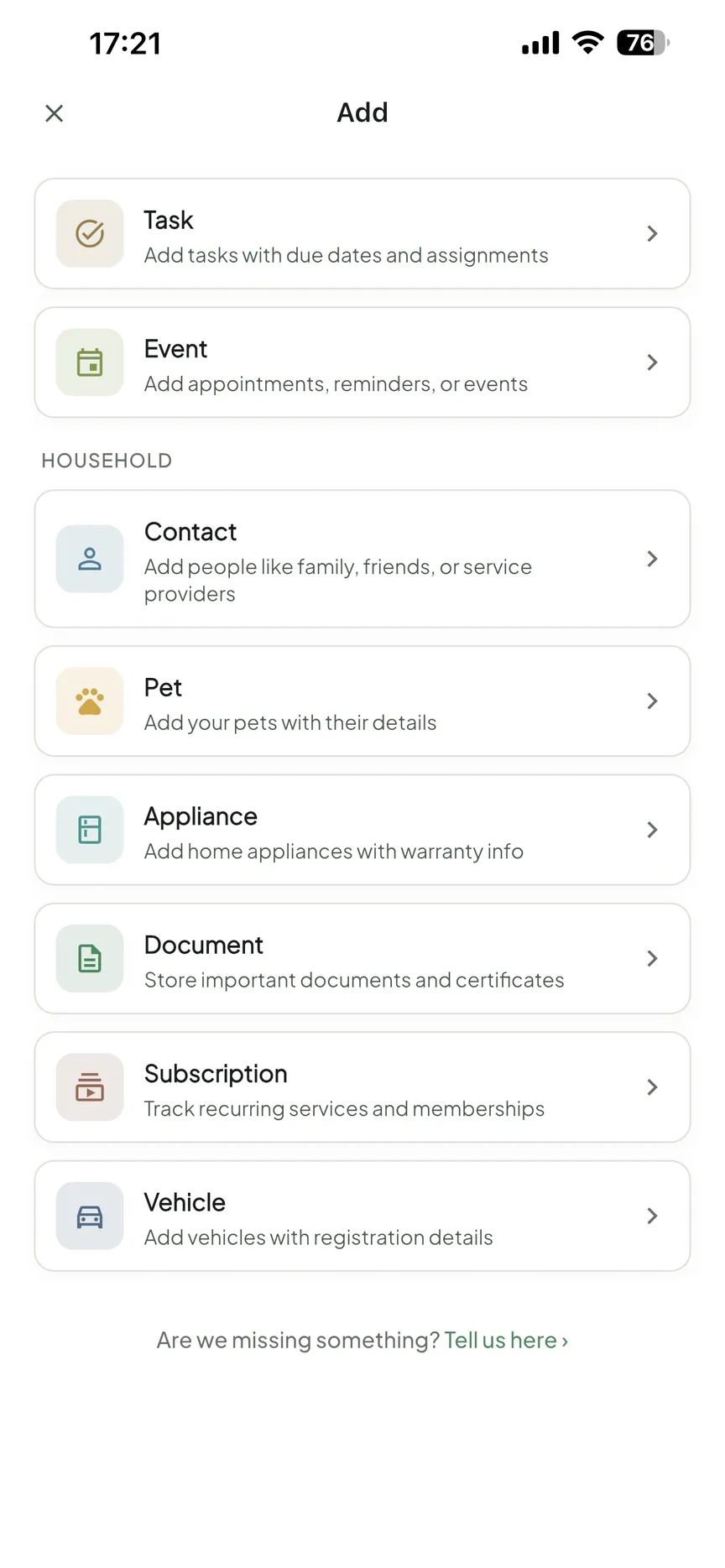
OneHaus logs household items with warranty expiry dates, receipts, and supporting documents, plus appliances, vehicles, pets, and subscriptions with a budget projection. This matters when you need a warranty in a hurry or want to know when a service contract ends, rather than digging through email and paper folders.
Family social features versus household management
FamilyWall leans into family connectivity. Shared photo albums and the family journal give households a private space to share memories and comment on photos. When we posted to the journal it behaved like a small private feed: family members could comment under a photo, and entries stacked into a running timeline instead of getting buried in a group chat. For families spread across several homes, that is the appeal.
OneHaus does not offer photo albums or a family journal. Its focus is narrower: the day-to-day running of a household through tasks, calendar, shopping, inventory, and meals. The two apps solve partly different problems, and that is the distinction to weigh.
Where FamilyWall works better
FamilyWall is the stronger fit when child safety and family connectivity are the priorities:
- You want a built-in family locator. Knowing where your children are during the school day is something FamilyWall does natively on Premium, and OneHaus has no equivalent. The Educational App Store review rates the locator as a real strength.
- You want a shared social space. Photo albums and the family journal give FamilyWall a social side OneHaus does not attempt.
- You want it in a browser. FamilyWall works on the web as well as iOS and Android. OneHaus is phone-first with no web app, so if half your household lives on a laptop, that is a genuine point against it.
- You want a family messenger and budget tracker in the same app. OneHaus has neither, though it does project subscription costs.
Where FamilyWall runs into limits
The free plan is the first limit. Five features out of fifteen is a narrow starting point, it carries ads, and the two things people most often want from a family app, the locator and Google Calendar sync, both sit behind the subscription.
The second is breadth. Calendar, messenger, budget, recipes, documents, timetables, and location in one interface is a lot of app, and the Educational App Store review makes the same point about how long it takes to set up. Recent App Store and Google Play reviews recur on calendar sync and notification reliability, so if external calendar sync is the reason you are subscribing, test it inside the 30-day trial rather than after it.
Where OneHaus works better
OneHaus goes deeper on running the house for households that do not need location tracking or a social feed.
Assignee rotation on repeating tasks is a practical improvement over assignment alone. FamilyWall lets you assign a to-do to a person. OneHaus cycles a repeating task through an ordered list of members, so the washing-up rota looks after itself.
The AI assistant changes how information gets into the app. Where the friction is remembering to capture things at all, plain-language input and sharing straight from another app removes most of it.
Home inventory has no equivalent in FamilyWall at any price. Warranties, appliances, vehicle records, and household documents would need a separate tool.
Meal planning is included in OneHaus rather than sold as an upgrade, and it links to recipes and back into a shopping list.
Who should choose FamilyWall
FamilyWall suits families where child safety and connection are the point. If real-time location sharing is something your household genuinely needs, FamilyWall does it well, and the family journal gives geographically spread families somewhere to keep in touch. Budget for Premium, because the free plan will not do those jobs.
Who should choose OneHaus
OneHaus suits households that want the running of the house in one place and do not want GPS tracking in the mix. If you want task rotation, an assistant that understands plain language, home inventory, and meal plans alongside a shared calendar and named shopping lists, that is the shape of it. It fits households currently juggling separate apps for tasks, shopping, and paperwork. If you need a browser version or a family locator, FamilyWall is the better call.
Frequently asked questions
Is FamilyWall free?
Partly. FamilyWall is free to download and the free plan covers a shared calendar, shopping lists, to-do lists, messenger, and a contact book. Its own plan chart strikes ten other rows off the free plan, including "Ad free", so the free version shows advertising.
How much is FamilyWall Premium in 2026?
$4.99 per month or $44.99 billed annually on FamilyWall's plans page, checked September 2026, after a 30-day free trial. The App Store listing quotes $7.99 per month for the US, with the same $44.99 yearly price. One subscription covers the family, not one account.
Is FamilyWall's family locator free?
No. The locator, Place Alert, and location history are Premium. FamilyWall's plan chart strikes both Family Locator and Place Alert off the free plan, and its Premium support article lists location under Premium. OneHaus has no location tracking on any plan.
Does FamilyWall track your location?
It can, but only on Premium and only if you opt in. Each person chooses whether to share their location. FamilyWall's own App Store listing warns that background location use can drain the battery heavily.
Is FamilyWall's meal planner free?
No. Meal Planner, Recipe Box, and Timetable are all Premium. Meal planning and recipes are included in OneHaus.
Does FamilyWall sync with Google Calendar for free?
No. Google and Outlook.com calendar sync, and subscribing to a calendar by URL, are Premium features. OneHaus syncs with your device calendar instead, one way by default, with a Both ways setting you can turn on.
What is a FamilyWall alternative without GPS tracking?
OneHaus. It has no location sharing or GPS tracking at all, and covers tasks with rotation, a shared calendar, named shopping lists, home inventory, meal plans, and a plain-language AI assistant. So you get the organisation without the whereabouts monitoring.
Does OneHaus have a family journal or photo albums like FamilyWall?
No. OneHaus focuses on household operations rather than social features. If a shared space for photos and memories matters to you, FamilyWall covers that alongside its organising tools.
Does OneHaus work in a web browser?
No. OneHaus is an iPhone, iPad, Apple Watch, and Android app, and it connects to ChatGPT and Claude. FamilyWall does have a browser version if that is a requirement for your household.
Try OneHaus
If you want a FamilyWall alternative built around running the household rather than tracking the family, try OneHaus. It is free to download on iPhone, iPad, Apple Watch, and Android, with a 30-day free trial of OneHaus Pro.