The Best Shared Grocery List App for Families 2026
Compare the best shared grocery list apps for families by sync speed, aisle sorting, recipes, platforms and pricing, so your household buys the right food.
Shopping & GroceriesThe best shared grocery list app in 2026
The best shared grocery list app for most families is OneHaus, because it keeps the same list live on everyone's phone, sorts items by aisle, and connects the weekly shop to tasks, calendar reminders, recipes and home inventory. Pick AnyList if recipe importing is the centre of your meal planning. Pick OurGroceries if you want a simple shared list and nothing else. The detailed comparison, with pricing checked June 2026, is below.
It is the strongest fit when two or more people add, shop and plan together across iPhone and Android, and you want the grocery list sitting beside chores, reminders and the family calendar rather than in yet another app to maintain.
I have run my own household shopping through every app here over the past few years, swapping the family between them to see which ones actually survive a Saturday big shop and which get quietly deleted. This roundup is built on that hands-on use, cross-checked against current pricing and independent reviews such as NerdWallet's grocery-list-app testing.
Getting the list right is worth more than it sounds. UK households throw away 4.4 million tonnes of edible food a year, worth around £17 billion, and a shared list everyone trusts is one of the simplest ways to buy less of what ends up in the bin. If you are shopping at UK supermarkets specifically, our pick for the best shared shopping list app in the UK weighs the same apps against how they handle Tesco, Sainsbury's and the rest.
Most "grocery list app" roundups grade these tools as if they were just a digital version of the scrap of paper on the fridge. Can you add an item, can you tick it off, done. That misses what actually makes one of these apps stick in a busy household and quietly get deleted from the next.
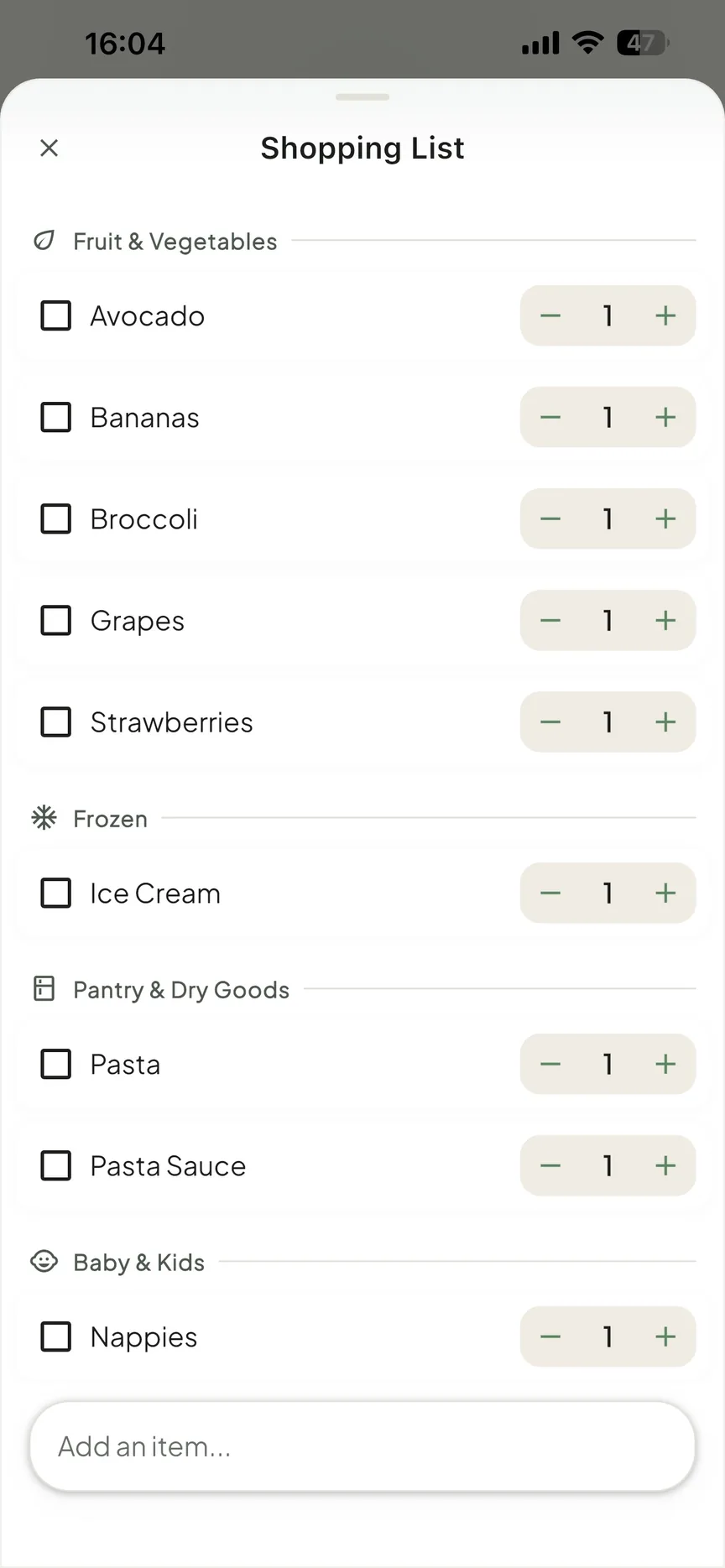
A grocery list lives or dies on three things. First, shared sync you can trust: when one person ticks off the milk in the shop, it has to drop off everyone else's screen quickly and reliably, or people stop trusting the list and go back to paper. Second, aisle sorting: a list grouped by fruit and veg, then chillers, then centre aisles turns a wander round the shop into one clean lap. Third, turning recipes into a list: deciding what to cook and ending up with the right ingredients on the list in one tap, with duplicates merged.
There is a fourth thing almost no roundup mentions. A grocery list does not exist in isolation. The same household that runs out of milk also has bins to put out, a school form due Friday, and a car booked in for service. The apps below mostly treat the list as the whole product. One of them treats it as one part of running the home, and for a lot of households that connection is the difference between another app to maintain and a home that just runs.
Best shared grocery list apps: quick comparison
| App | Best for | Why it works |
|---|---|---|
| OneHaus | Families running the whole home from one place | Shared grocery lists, aisle sorting, recipes, inventory, tasks and calendar reminders in one household subscription |
| AnyList | Recipe-first meal planners | Deep recipe import, meal plans and list merging for households that mostly plan from recipes |
| OurGroceries | Fast shared lists on a budget | Quick sync, simple sharing and a low learning curve |
| Bring! | Visual shoppers | A friendly icon-led list that is easy for casual shoppers to scan |
| Google Keep | Very simple shared checklists | Good enough if you only need a tickable note and everyone already uses Google |
| Out of Milk | Pantry and price tracking | Useful when pantry inventory and running totals matter more than a polished family workflow |
Which are the best grocery list apps?
Pricing below was checked June 2026. Always check each app's own page for the current figure, since these change.
OneHaus
OneHaus is an AI-powered household app, and the grocery list is one piece of it. Your shopping list syncs across every device, so whoever is at the shop sees what whoever is at home just added. The list auto-sorts by aisle, so you are not doubling back for the thing you missed. Recipes let you save the meals you actually cook and add their ingredients to the list in one tap. The AI assistant understands plain language, so "add milk to the shopping list" just works, no menus, no tapping through a form. You are not limited to one running list either: a household can keep up to 20 named lists, so a weekly shop, a DIY list and a party list stay separate instead of tangled into one.
The wider point is what surrounds the list. The same app holds your tasks (with rotation, so chores actually move round the household), a shared calendar that syncs with Apple and Google, and a home inventory. So "we've run out of bin bags" lands in the same place as the list it belongs on, and the household admin you were juggling across four apps lives in one. OneHaus is ad-free and built privacy-first; you can read exactly what it does and does not collect in its privacy policy.
Strengths: shared list synced across devices, automatic aisle sorting, one-tap recipe-to-list, natural-language AI assistant, and everything sitting alongside tasks, calendar and inventory.
Limits: a dedicated grocery app like AnyList or Bring! has had a decade to pile up niche grocery features (per-store filtering, item photos, loyalty cards), and OneHaus does not match every one of those yet. Its strength is breadth and the list living with the rest of the household, not grocery minutiae.
Platforms: iPhone, iPad, Apple Watch and Android, plus connected AI assistants.
Pricing: free to download with a 30-day trial, then a single household subscription that covers everyone in the home, with no per-person charge.
Best for: households that want one shared list that lives alongside their tasks, calendar and the rest of home life.
AnyList
AnyList is the grocery list power user's choice. It imports recipes from food blogs, plans your week, and turns the whole plan into one combined shopping list with duplicates merged, so two recipes calling for onions become a single line. Item photos, per-store assignment, price tracking with a running total, recipe scaling and folders round it out. Sharing and sync are polished.
Strengths: the deepest recipe and meal-planning workflow here, strong shared lists, item photos and per-store filtering.
Limits: the most useful extras (web and desktop access, recipe import, item photos, budget tracking) sit behind the paid AnyList Complete tier. Some users find sync between devices occasionally inconsistent, and it can be overkill if you only want a plain list.
Platforms: iPhone, iPad, Android, Apple Watch, and Mac/PC/web (web and desktop need Complete).
Pricing: free with core list sharing; AnyList Complete is $9.99 a year for an individual or $14.99 a year for a household (checked June 2026).
Best for: keen meal planners who turn recipes into shopping lists every week. See our OneHaus vs AnyList comparison for the line-by-line detail.
OurGroceries
OurGroceries has been quietly reliable for years and is the value pick. Every core feature is free, including fast real-time sharing across the household, aisle sorting with region-specific category suggestions, recipe cataloguing with one-tap add to list, photo and barcode entry, and voice adding through Alexa, Siri or Google Assistant. Its real-time sync is among the quickest of any list app: in a dated test running two phones against the same list, OurGroceries settled a tick-off across devices in a few seconds, faster than the other dedicated apps tried alongside it.
Strengths: genuinely fast sync, all core features free, voice and barcode entry, an inexpensive whole-household ad-removal upgrade.
Limits: the interface looks dated, the free tier carries ads, and there is no real budget or spending tracking beyond manual per-item price estimates.
Platforms: iPhone, iPad, Android, Apple Watch, Wear OS, web, and Alexa.
Pricing: free with ads; removing ads for the whole household costs $0.99 a month, $5.99 a year, or a one-off $19.99 (OurGroceries pricing, checked June 2026).
Best for: households wanting the cheapest, fastest, most reliable shared list. We have broken it down in our OneHaus vs OurGroceries comparison.
Bring!
Bring! is the best-looking app of the bunch. Instead of plain text, common items show as picture tiles, which makes lists visually scannable and easy for everyone in the house to add to. Items auto-sort into aisle-style categories, with pre-made templates for occasions, store loyalty card storage, and an iPhone home-screen widget. Sharing is link-based, so collaborators do not need a specific account.
Strengths: the most approachable, visual interface, automatic aisle categories, loyalty cards, and a strong free tier.
Limits: the picture tiles slow down on long lists, there is no price or budget tracking at all, and some users report occasional sync hiccups. The built-in offers and inspiration content can feel like filler.
Platforms: iPhone, Android, and web.
Pricing: free with ads; Bring! Premium removes ads and adds themes for $1.99 a month or $8.99 a year (checked June 2026).
Best for: visual shoppers and quick top-up lists where a pretty, low-friction list matters more than budgeting.
Google Keep
Google Keep is not a grocery app at all, just shared checklist notes, and for some couples that is exactly the appeal. No new account, no learning curve. Tick an item and it drops to the bottom, "uncheck all" resets the list for next time, and you can build rough categories with indented sublists. Sharing is real time. Voice adding works through Google Assistant.
Strengths: free forever, zero setup, real-time sharing, and reusable lists.
Limits: no true aisle sorting, no quantities or prices, no recipe link, and everyone you share with needs a Google account. It gets clumsy beyond two people or a short list.
Platforms: Android, iPhone, and web.
Pricing: free (Google Keep, checked June 2026).
Best for: couples who want the absolute minimum and already live in Google.
Out of Milk
Out of Milk bundles a shopping list with a pantry inventory and a to-do list. The shopping list does real-time sharing, barcode scanning, aisle-style categories, per-item price, quantity and running totals, plus list history and templates. The pantry list lets you track what you already have so you do not buy it twice.
Strengths: shopping plus pantry plus to-do in one free app, barcode entry, and per-item price tracking with totals.
Limits: ad-supported (its former ad-free Pro tier is no longer sold to new users), and users have reported an ongoing bug where custom category ordering goes random in store, which undercuts the aisle-sorting benefit.
Platforms: iPhone, Android, and web.
Pricing: free with ads; its former ad-free Pro tier is no longer available to new users (Out of Milk, checked June 2026).
Best for: shoppers who want a pantry inventory and price totals attached to the same free list.
How do the best grocery list apps compare?
| App | Shared sync | Aisle sorting | Recipe to list | Voice / AI | Platforms | Price (checked June 2026) |
|---|---|---|---|---|---|---|
| OneHaus | Yes, syncs across devices | Yes, automatic | Yes, one tap | Natural-language AI assistant | iPhone, iPad, Apple Watch, Android, AI assistants | Free trial, then one household subscription |
| AnyList | Yes | Yes | Yes, with merge | Limited | iPhone, iPad, Android, watch, desktop, web | Free; Complete $9.99/yr, $14.99/yr household |
| OurGroceries | Yes, very fast | Yes | Yes, one tap | Alexa, Siri, Google | iPhone, iPad, Android, watch, web, Alexa | Free with ads; ad-free $5.99/yr or $19.99 once |
| Bring! | Yes | Yes, automatic | Limited | No | iPhone, Android, web | Free with ads; Premium $8.99/yr |
| Google Keep | Yes | No | No | Google Assistant | Android, iPhone, web | Free |
| Out of Milk | Yes | Yes (sorting bug reported) | No | No | iPhone, Android, web | Free with ads (Pro tier discontinued) |
The habits that make a shared list actually stick
The app matters less than you would think. Get the adoption habits right and any of the apps above will work; get them wrong and even the best app quietly gets deleted within a few weeks. For the full method, from capturing items instantly to ordering the list by aisle, see our guide to how to make a grocery list.

- Start low-key. Send a casual invite rather than a list of demands: "trying this so we stop forgetting things at the shop, want to give it a go?" works far better. Pre-populate the list with 10 to 15 weekly essentials before anyone else opens it, so it looks useful from the first glance rather than empty and abstract.
- One list, one home for it. Two competing lists, an app plus a lingering group chat, are worse than none, because nobody fully trusts either. Delete the rivals once the shared list is live.
- Tick off the moment it is in the trolley, not at the till. That single habit is what actually stops double-buying: cross-device sync only helps if what is ticked off is current the moment someone else glances at the list.
- Set recurring items for the predictable stuff. Milk, bread, coffee, bin bags: whatever you buy every week, set it to reappear automatically rather than re-adding it from memory each time.
Purpose-built apps beat the workarounds most households start with. A messaging thread buries items under conversation with no way to tick anything off. A notes app rarely syncs cleanly and has no concept of "bought," so one person's edits silently overwrite the other's. Paper or memory works right up until the week it does not.
How do you choose a grocery list app?
Start with how your household actually shops, not the longest feature list.
If two or more people add to the list and split the shopping between you, sync you can trust is non-negotiable. OneHaus, OurGroceries and AnyList all keep a shared list current across devices, and OurGroceries is famously quick. Before you choose, test the exact household flow: add milk from one phone, tick it off from another, then check whether the first phone updates before anyone buys a second carton.
If your home mixes iPhone and Android, check the platform list before you get attached. OneHaus has native iPhone, iPad, Apple Watch and Android apps, plus AI assistants via MCP, so the person at home and the person in the shop can use the same list without needing the same device. Apple-only tools can be fine for one-household ecosystems, but they break down as soon as one person shops on Android.
If you decide meals first and shop second, prioritise recipe-to-list. AnyList is built around it, OneHaus and OurGroceries do it in a tap, Bring! offers lighter recipe support, and Keep does not really do it.
If you just want the cheapest reliable list, OurGroceries free or Google Keep will serve you. If you want a pretty, low-effort list, Bring! is the nicest to look at.
And if the shopping list is one of several things you are trying to keep straight across the household, the tasks, the calendar, the things that run out, then a dedicated grocery app leaves you stitching apps together. That is where OneHaus earns its place: the list lives next to everything else, so you are running a home, not maintaining a shelf of single-purpose apps.
Frequently asked questions
What is the best grocery list app in 2026?
For most households it is OneHaus, because the list keeps every device in sync, sorts by aisle, builds itself from your recipes, and sits alongside your tasks, calendar and home inventory rather than in a separate app. If recipe-led meal planning is your priority, AnyList is the strongest dedicated grocery pick, and OurGroceries is the best free, no-frills shared list.
What is the best shared grocery list app for families?
OneHaus and AnyList lead for families. Families produce far more than a shopping list, so OneHaus keeping the list next to shared tasks, the family calendar and home inventory is what turns a list app into a home that runs. AnyList wins if meal planning from recipes is the heart of your week and you are happy to pay for Complete. For a free option, OurGroceries shares reliably across the whole household.
Do grocery list apps work offline in the supermarket?
The good ones do. Large supermarkets are full of signal dead zones, so an app that blanks by the freezers gets deleted fast. OneHaus, AnyList, OurGroceries and Bring! all keep your list usable without signal and sync your ticks once you are back online. It is worth testing before you commit: walk to the back of your nearest big store, add an item, and see whether it survives the round trip.
Can I share one grocery list across different phones and a computer?
Yes. Most apps here work across the major phone platforms, and several add web access so a laptop counts too. OneHaus has native apps for iPhone, iPad, Apple Watch and Android, plus connected AI assistants, so whether you are on iPhone or Android the person at the shop can use their phone while the person at home adds the thing they just remembered, or simply asks the assistant to add it hands-free.
How much do grocery list apps cost?
Several have a free tier: OurGroceries, Bring! and Out of Milk are free with ads, and Google Keep is free outright. Paid upgrades are modest, roughly $6 to $20 a year. OneHaus works differently: a free download with a 30-day trial, then one household subscription that covers everyone in the home with no per-person charge, in exchange for the list living alongside your tasks, calendar and inventory.
The bottom line
There is no single winner for every household, but the pattern is clear. For a pure grocery list, AnyList rewards meal planners and OurGroceries is the value champion, with Bring! the prettiest and Keep the simplest. For households who want the shopping list to be one calm part of running the home rather than yet another app to keep alive, OneHaus is the pick, because the synced, aisle-sorted, recipe-fed list sits right next to your tasks, calendar and home inventory.
If that is you, start your free OneHaus trial and you will have a shared list running before the kettle boils. To see how it fits a busy household, read more on OneHaus for families, or compare it head to head in our OneHaus vs AnyList and OneHaus vs OurGroceries breakdowns. You can also see how it stacks up against Bring! and Listonic, or browse the full AnyList alternatives roundup.