Best Co-Parenting Apps in 2026: For Households Sharing the Load
The best co-parenting apps for 2026 if you share the load of raising children with a partner, grandparent or co-parent on good terms, plus where to go if you need court records.
Family Organisation"Co-parenting" means different things, and the right app depends on which one is yours. Find your situation first.
- Two adults raising children in one home. You share the work: school runs, meals, shopping, the washing. You need one calendar and a fair split of tasks.
- Parents or carers across two homes who are on good terms. That can include a grandparent or a nanny who does part of the week. You need the same calendar, tasks and lists in every home.
- Separated parents who need a documented record. You need messages that cannot be altered and exports you can hand over. That is a different kind of app, and it is covered in a short section near the end.
This guide is mostly for the first two. It compares the apps that help a household share the load, with sourced prices, and says where each one is stronger than OneHaus and where OneHaus is stronger. It is general information, not legal advice.
Quick verdict:
| If you need... | Start with... | Why |
|---|---|---|
| Tasks that rotate, plus calendar, shopping and meals, with your email and photos read for you | OneHaus | One household app, one subscription for everyone |
| A shared calendar and lists you can start free | Cozi | Free tier, long track record |
| A calendar you forward email and photos to, with a free plan | Sense | Forwarded email and photo capture, chores included |
| Calendar plus lists with email forwarding | Jam Family Calendar | Events created from forwarded email |
| The cheapest way to share a calendar | Google Calendar | Free, with a shared Family calendar |
| A documented record of messages | See the last section | A specialist co-parenting app |
What should a co-parenting app do for a household sharing the load?
If you are splitting the work rather than recording it, the job is visibility and fairness. Most households need five things.
- One shared calendar. School events, appointments and who is doing pickup, visible to every adult.
- Tasks with owners and rotation. A job with a name on it gets done. A job that rotates stops one person being the default parent. The mental load guide and the mental load checklist cover why that matters.
- Shared shopping and meals. One list that either adult can add to, ideally tied to what you are cooking.
- Reminders. For the dentist, the school trip form, the bins.
- Access for a grandparent or nanny. Someone outside the immediate household needs to see the week without you re-typing it.
Not every app does all five. The co-parenting app guide goes deeper on the different meanings of the word.
The best co-parenting apps for sharing the load in 2026
1. OneHaus: best for sharing tasks fairly
OneHaus is a house organiser. Everyone in the household shares one calendar, tasks, shopping lists, meal planning and recipes, and home inventory. On a repeating task you can add several people under Assignee Rotation and OneHaus assigns them in the order you list, one per occurrence, so the bins or the school-lunch prep move round on their own. A "Remind me before" setting on a task sends a reminder ahead of its due date, and shopping lists are sorted by aisle. Connect an email inbox and OneHaus suggests events, tasks and bills from the school, club and booking emails it finds, for you to review before they are added. A photo of a letter does the same through Ask OneHaus.
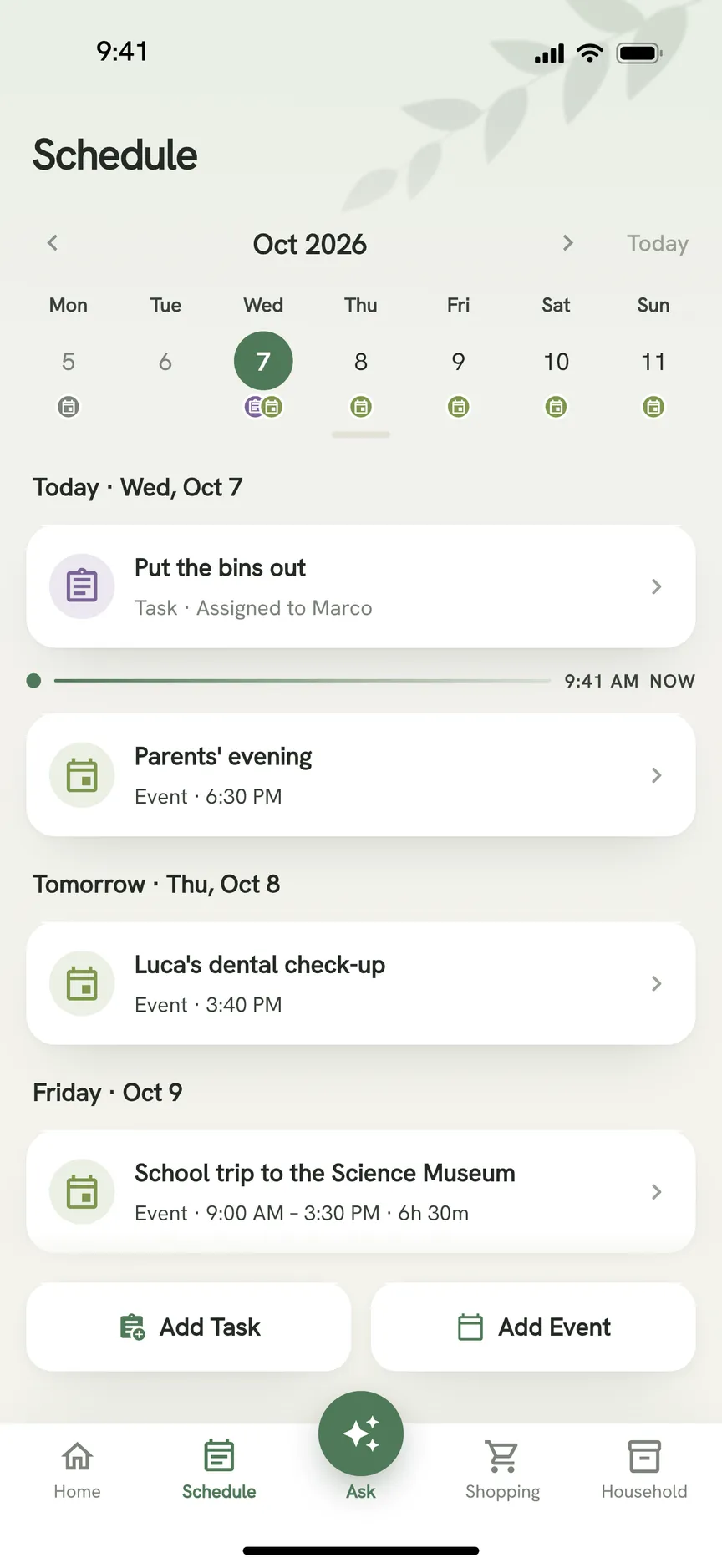
Adults join with an invite code, and an owner can add a family member who has no login of their own so they can be given tasks. Members get full access to tasks, calendar, shopping, inventory, contacts and chat, so there is no limited role for a nanny or grandparent. OneHaus is available on iPhone, iPad, Apple Watch and Android. Every household starts with a free 30 day trial of everything. After that, one OneHaus Pro subscription covers the household with no per-person fee, and one-off tasks and shopping lists stay free. The price is shown in the app at purchase and varies by region and store. Calendar events are part of OneHaus Pro (see Plans and Subscription).
Best for: partners, and parents or carers on good terms, who want chores shared fairly beside the calendar and lists. See for co-parents.
2. Cozi: best to start free
Cozi is a long-established family organiser with a shared colour-coded calendar, shopping lists that sync in real time and to-do lists with basic assignment. The free tier carries adverts and shows only 30 days of calendar ahead. Cozi Gold at $39 a year removes the adverts and the limit, and Cozi Max at $79 a year adds AI event import from email, an AI recipe creator and an AI meal planner. It runs on iOS, Android and the web (checked September 2026, per OneHaus vs Cozi).
Where it is stronger than OneHaus: it has a free tier and has been around for over 20 years. Where OneHaus is stronger: repeating tasks rotate between people on their own, there are no adverts, and the calendar has no 30 day limit.
Best for: families who want a shared calendar and lists at no cost to begin with.
3. Sense: best for forwarding email and photos, with a free plan
Sense: AI Family Organizer puts dates from email, photos, screenshots and messages onto a shared family calendar. It also has chores assigned to family members, shared lists, meal planning and recipes. The pricing page lists a free plan with 10 AI actions a month. Premium adds unlimited AI actions, calendar sync with Google, iCloud and Outlook, and one Premium subscription covers unlimited family members. The App Store listing shows $6.99 a month or $59.99 a year. It runs on iPhone, iPad and Apple Watch, on Android through Google Play and on the web (checked October 2026, per OneHaus vs Sense).
Where it is stronger than OneHaus: it has a free plan with 10 AI actions a month, and it runs on the web. Both read email and photos. Sense reads what you forward, and OneHaus connects to an inbox and reads it for you as part of OneHaus Pro. Where OneHaus is stronger: nothing has to be forwarded, repeating tasks rotate between adults, and home inventory keeps appliances, vehicles, warranties and documents with the rest of the household.
Best for: households who want to start free and forward the emails and screenshots that matter.
4. Jam Family Calendar: best for email forwarding into a calendar
Jam is a shared family calendar with shared to-do and shopping lists and email forwarding, which its site describes as: "Forward it to Jam, and watch the events pop up in your calendar." It connects to Google and Apple calendars. On the App Store it is listed for iPhone and iPad at $15.99 a month or $119.99 a year for a family membership, after a 30 day free trial (checked October 2026, per OneHaus vs Jam).
Where it is stronger than OneHaus: it is focused on the calendar and the email forward, so there is less to learn. Where OneHaus is stronger: it runs on Android and Apple Watch as well as iPhone and iPad, it rotates tasks and plans meals, and it reads a connected inbox without anyone forwarding. Where Jam costs more: its family membership is priced well above the others here.
Best for: families who mostly want the calendar and lists, and live in their inbox.
5. Google Calendar: best free option for sharing with a grandparent
Google Calendar is free. Creating a Google family group of up to six people gives you a shared calendar called Family that anyone in the group can edit. You can also share any calendar with specific people at different permission levels, which works for a grandparent or childminder outside the group. Keep notes can be shared with the family group for lists (Google help pages, checked October 2026, per OneHaus vs Google Calendar).
Where it is stronger than OneHaus: it costs nothing. Where it stops: we found no chore rotation or meal planning in Google's family help pages.
Best for: families who only need a shared calendar, and want the lowest cost.
Co-parenting app comparison table
| App | Best for | Tasks and chores | Price | Free option | Platforms |
|---|---|---|---|---|---|
| OneHaus | Fair task rotation beside the calendar, with a connected inbox | Yes, with automatic rotation | One household subscription after the trial | 30 day trial; lists and one-off tasks stay free | iPhone, iPad, Apple Watch, Android |
| Cozi | Starting free | Basic to-do assignment | Gold $39 a year, Max $79 a year | Yes, with adverts and a 30 day calendar view | iOS, Android, web |
| Sense | Forwarded email and photo capture, with a free plan | Chores assigned to family members | Premium $6.99 a month or $59.99 a year | Yes, 10 AI actions a month | iPhone, iPad, Apple Watch, Android, web |
| Jam Family Calendar | Calendar with email forwarding | Shared to-do lists | $15.99 a month or $119.99 a year | 30 day trial | iPhone, iPad |
| Google Calendar | Lowest cost sharing | None found in Google's family help | Free | Yes | Any device you sign in on, per Google |
Do you need a documented record instead?
A house organiser is the wrong tool if you need unalterable records, tone checks or exports of your messages. OneHaus has none of those, and the apps above do not either. That calls for a specialist co-parenting app such as OurFamilyWizard or TalkingParents. Our comparisons, OneHaus vs OurFamilyWizard and OneHaus vs TalkingParents, set out what each one does and costs.
How to choose a co-parenting app
Start with what you are sharing. If it is the week, the jobs and the shopping, pick one app that all the adults will open and that covers the five needs above. If one job matters most, choose for that: rotation or an inbox read for you points to OneHaus, free points to Cozi or Google Calendar, and forwarding email into a calendar points to Sense or Jam.
Then check the money. Cozi has a free tier, Google Calendar is free, and Sense has a free plan with 10 AI actions a month. OneHaus and Sense each cover the household with one subscription, and Jam sells one family membership.
Finally check devices. Everyone who needs the week has to be able to open the app on their own phone, so check iPhone and Android before you commit.
Frequently asked questions
What is the best co-parenting app?
It depends on which kind you mean. For a household sharing the load, OneHaus if you want tasks to rotate, Cozi or Google Calendar if you want to start free. For documented records after a separation, a specialist app such as OurFamilyWizard or TalkingParents.
What is co-parenting?
It means two or more adults sharing the work of raising children. That can be partners in one home, or parents and carers across two homes. The word is also used for parents who have separated. This guide focuses on sharing the load, and the co-parenting app guide explains the meanings in more depth.
Is there a free co-parenting app?
For sharing a calendar and lists, yes. Google Calendar is free, Cozi has a free tier and Sense has a free plan with 10 AI actions a month (checked October 2026 and September 2026 on the vendors' pages). OneHaus has a 30 day trial, then lists and one-off tasks stay free. Free records apps are not covered here.
What is the best co-parenting app for a grandparent or nanny?
Whoever helps needs to see the week. Google Calendar lets you share a calendar with specific people. In OneHaus they join with an invite code and get full member access.
Can OneHaus replace a co-parenting records app?
No. OneHaus has no unalterable message log, certified records or recorded calls. See the signpost section above.
Which co-parenting app should you pick?
Pick OneHaus if you want tasks shared fairly and rotating, with your inbox and photos read for you. Pick Cozi or Google Calendar to start at no cost, Sense to forward email and photos into a calendar with a free plan, and Jam for email forwarding into a calendar. If you need a documented record, use one of the specialist apps above.
For more, read the co-parenting app guide and the family shared calendar guide. Try OneHaus on iPhone, iPad, Apple Watch or Android.