OneHaus vs Google Calendar for Families (2026)
Google Calendar is free, and a family group gives you a shared calendar called Family at no extra cost. If a shared calendar is all your household needs, you do not need OneHaus. OneHaus adds the parts a calendar leaves out, such as chore rotation, shopping lists, meal planning and home inventory, with the calendar kept alongside them.
What is Google Calendar for families?
Google Calendar is Google's free calendar. Used as a family tool, it has two main ways to share.
The first is a Google family group. A group can have up to six people, and Google creates a shared calendar called Family for it. Anyone in the family can make changes to events on the family calendar, and anyone who leaves the group loses access (Google Families Help, checked October 2026).
The second is sharing any calendar with specific people. Google's sharing help covers sharing a calendar and the permission levels you can give each person (Google Calendar Help, checked October 2026). That works for a grandparent, a childminder or a co-parent who is not in your family group.
Google Calendar can also add events from Gmail on its own, such as flights and restaurant bookings. Google's help page says events from Gmail are off by default in the European Economic Area, Japan, Switzerland and the UK, so households there have to turn it on (checked October 2026).
For notes and lists, Google points families to Keep. A note shared with the family group can be edited or deleted by anyone in the family (Google Keep Help, checked October 2026).
What is OneHaus?
OneHaus is an AI-powered household management app. It puts a shared calendar, tasks with rotation, shopping lists sorted by aisle, meal planning and recipes, home inventory and an AI assistant called Ask OneHaus in one app.
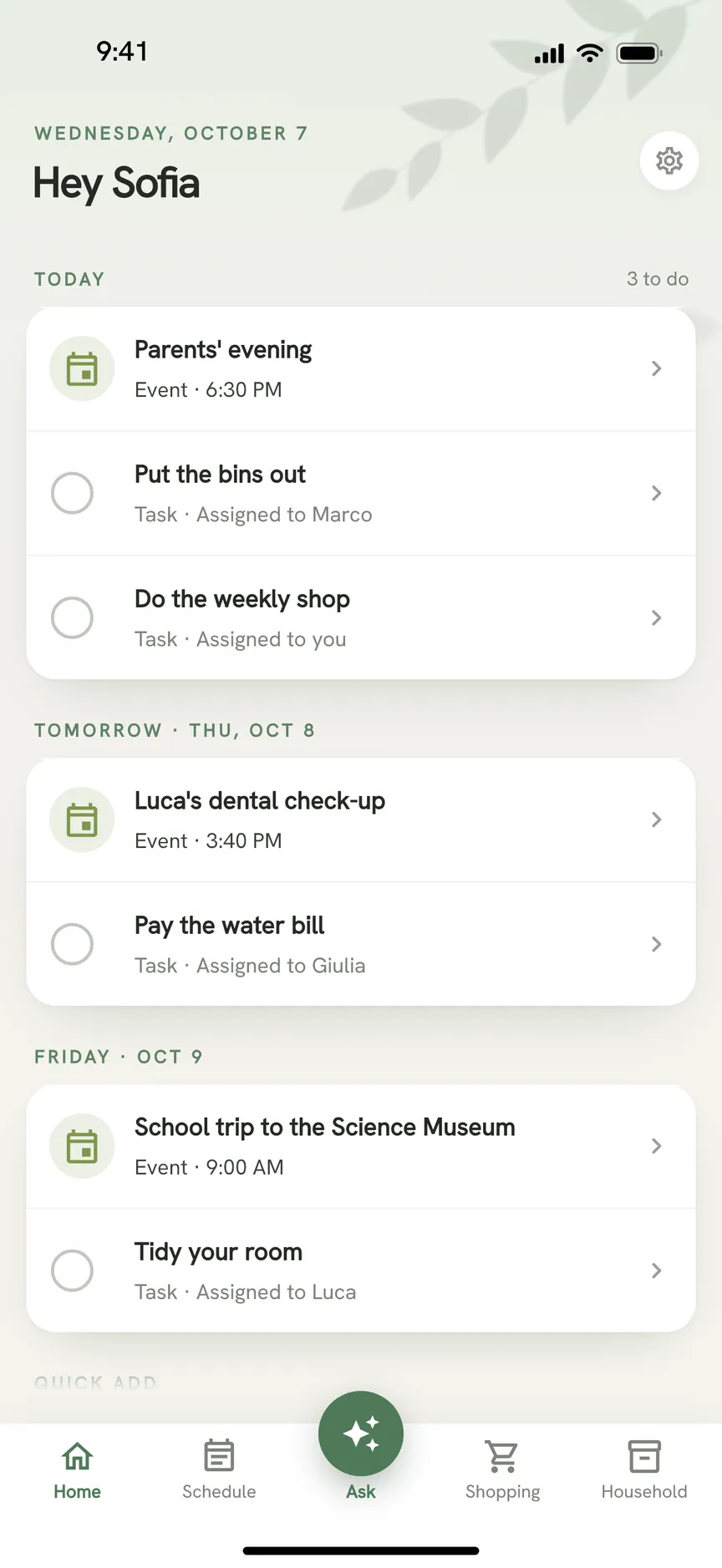
The calendar has a month view, repeating events, reminders from an hour to two weeks ahead, and tasks with due dates in the same agenda. It works with the calendar on your phone, so it does not replace Google Calendar. OneHaus copies household events into a calendar you pick on the phone, which can be a Google account you have already added there. That is one-way by default. Switch it to two-way and OneHaus also reads events from that calendar. You choose whether those stay on your own device or go to the whole household.
OneHaus can also connect an email inbox and suggest bills, bookings and appointments for you to add or dismiss. Email inboxes are part of OneHaus Pro, and every household starts with a 30 day free trial. OneHaus runs on iPhone, iPad, Apple Watch and Android. After the trial, one household subscription covers everyone who lives there.
Feature comparison
| Feature | Google Calendar | OneHaus |
|---|---|---|
| Shared family calendar | Yes, a Family calendar for a family group of up to six | Shared household calendar |
| Sharing with people outside the household | Yes, with permission levels | Not a focus. The calendar is for the people who live together |
| Phone calendar sync | Works as a calendar account on your phone | Syncs with your phone's calendar, one-way by default, two-way optional |
| Events from email | From Gmail, off by default in the UK and EEA | From a connected inbox, with suggestions you review (OneHaus Pro) |
| Shared notes and lists | Keep notes shared with the family group | Shopping lists sorted by aisle, and tasks |
| Chores and rotation | Not part of Google Calendar | Tasks with recurring schedules and automatic rotation |
| Meal planning | Not part of Google Calendar | Meal planning and recipes, with ingredients added to lists |
| Home inventory | Not part of Google Calendar | Appliances, vehicles, pets, warranties and documents |
| AI assistant | Not part of Google Calendar | Ask OneHaus, for typed and spoken requests, photos and PDFs |
| Price | Free | 30 day trial, then one household subscription |
Key differences
A calendar versus a household
Google Calendar does one job and does it well. A shared Family calendar answers "who is where on Thursday". It does not answer "whose turn is it to do the bins", "what are we eating this week" or "when does the boiler warranty end". Google's family help pages describe the calendar and Keep, and we found nothing there for chore rotation, meal planning or home inventory (checked October 2026). Households that want those usually end up with a spreadsheet, a notes app or a chat thread.
OneHaus keeps them in the same app as the calendar. A task with a due date appears in the agenda next to the events, so the evening's chores and the parents' evening sit on one screen.
Free versus subscription
Google Calendar costs nothing. OneHaus has a 30 day trial and then a household subscription. That is a real difference. If all you want is a place to put events and everyone already has a Google account, free wins, and you should stay where you are.
The case for paying is when you are already stitching several tools together to cover chores, shopping and the calendar, and the stitching is where things get dropped.
Keeping your Google calendar
You do not have to choose. Many households keep Google Calendar for the family group and for work, and add OneHaus for everything else. Because OneHaus syncs with the calendar on your phone, events from a Google account on that phone can be read into OneHaus once you switch sync to two-way. OneHaus does not connect to Google directly, so sync goes through the calendar app on the phone.
If your question is how to set up the sharing itself, we already cover it. How to share a Google Calendar on iPhone and how to share a calendar on iPhone walk through the steps.
Adding things
In Google Calendar you fill in a form, or let Gmail add bookings for you where that setting is on. In OneHaus you can type or say what you need and Ask OneHaus puts it in the right place. A photo or PDF of an invitation or a booking fills in the new event form, and you check it before saving.
Where Google Calendar works better
It is free, and for many households that settles it.
If your household already has Google accounts, there is nothing new to set up and nobody to persuade.
Sharing is more flexible. You can share a calendar with people outside the household and set what each person can do, which suits a co-parent, a relative or a childminder. OneHaus is built for the people who live together.
Gmail can add flights, hotels and restaurant bookings by itself, where it is switched on. OneHaus needs an inbox connected and works from suggestions you approve.
A calendar is all Google Calendar has to be, while OneHaus spreads its effort across a lot more. If calendar depth is your priority, Google is the safer pick.
Where OneHaus works better
Chores rotate on their own. Set the tasks once and OneHaus cycles them through the household, so nobody has to remember whose turn it is.
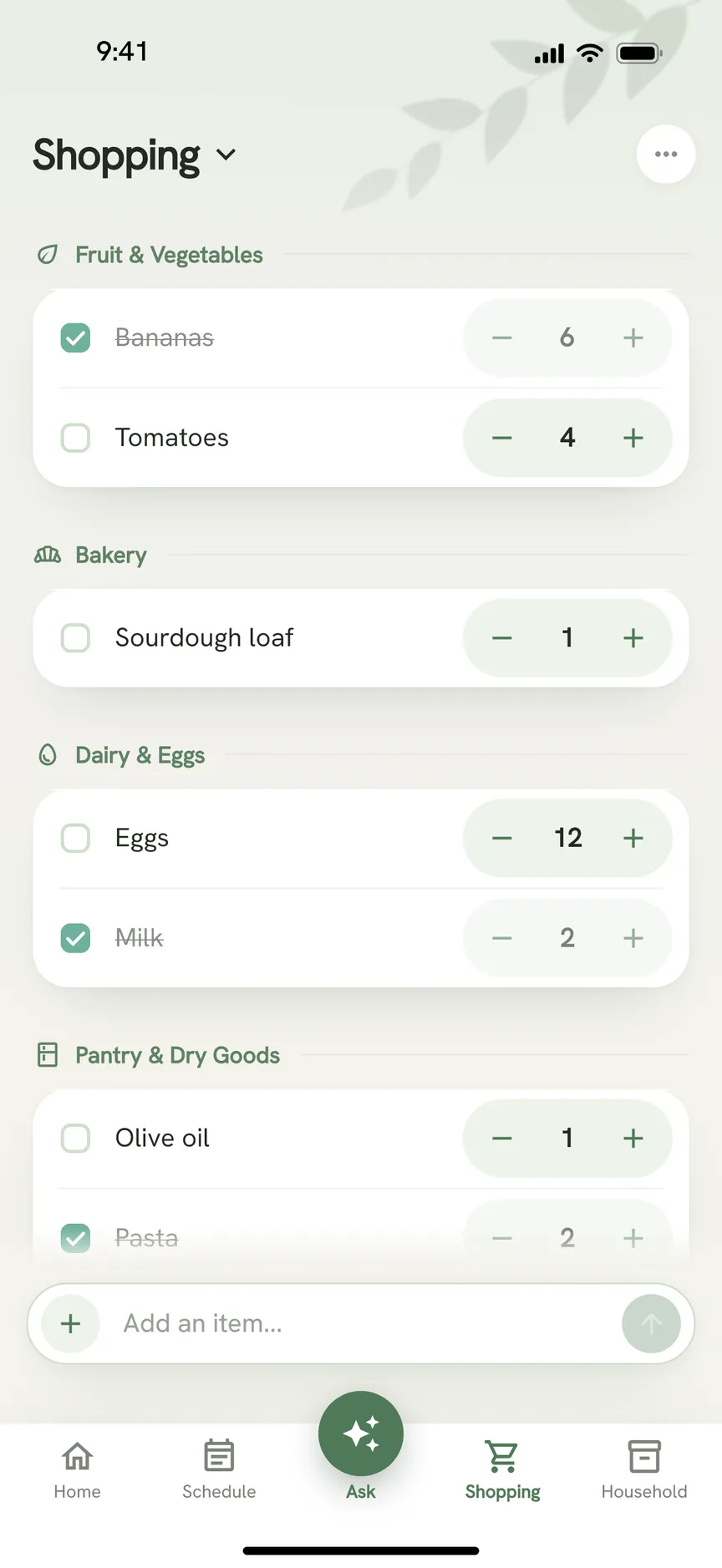
Shopping lists are sorted by aisle and sync across devices. Meal planning and recipes add ingredients straight to a list.
Home inventory keeps appliances, vehicles, pets, warranties and documents with the household, so the warranty email and the calendar reminder for it are in the same place.
Ask OneHaus takes typed and spoken requests, photos and PDFs, and shares from other apps. Email inboxes, part of OneHaus Pro, suggest bills and bookings from a connected inbox.
OneHaus can also subscribe your shared calendar to public holidays for 63 countries, and to any .ics or webcal feed such as school term dates or a club's fixtures.
Who should choose Google Calendar
Google Calendar suits households that only need a shared calendar and are happy to use a free one. If everyone has a Google account, you coordinate mostly through events, and chores and shopping are already handled some other way, it is enough.
It also suits households that need to share a calendar with people outside the home, such as a co-parent, grandparents or a childminder, with control over what each can do.
Who should choose OneHaus
OneHaus suits households whose calendar is the easy part. If the harder part is who does the chores, what is for dinner, what is on the shopping list and where the warranty for the dishwasher went, a calendar on its own will not fix it.
It also suits households that want to keep Google Calendar where it is and add the rest alongside it, with the phone calendar syncing between the two.
Frequently asked questions
Is Google Calendar free for families?
Yes. Google Calendar is free, and creating a family group gives the group a shared calendar called Family. A group can have up to six people (Google Families Help, checked October 2026). OneHaus has a 30 day trial, then one household subscription.
How do I use Google Calendar for families?
Create a family group in your Google account and Google adds a shared Family calendar that everyone in the group can edit (checked October 2026). For the steps on a phone, see how to share a Google Calendar on iPhone.
Is there a Google family calendar for chores and shopping?
Google's family help pages describe the Family calendar, and Keep notes that you can share with the family group (checked October 2026). We found no chore rotation, meal planning or inventory there. OneHaus has all three, alongside the calendar.
Why are no events from Gmail showing in my Google Calendar?
If you are in the UK, the European Economic Area, Japan or Switzerland, Google says events from Gmail are off by default and you have to turn them on (checked October 2026). OneHaus can connect an inbox and suggest events for you to review, as part of OneHaus Pro.
Does OneHaus sync with Google Calendar?
Not directly. OneHaus syncs with the calendar on your phone, which includes any Google account you have added there. Sync is one-way by default, from OneHaus to the phone. Switch it to two-way and OneHaus also reads events from that calendar back in.
Do I need OneHaus if I already use Google Calendar?
Not for the calendar alone. If a free shared calendar covers what your household needs, keep it. OneHaus is for the chores, shopping, meals and inventory around the calendar.
Try OneHaus free
If Google Calendar covers the dates but not the rest of running the house, give OneHaus a try. It is free to download on iPhone, iPad, Apple Watch and Android with a 30 day trial, and it syncs with the calendar you already have on your phone.
Download OneHaus to get started.