OneHaus vs Apple Family Sharing (2026): Shared Calendar and Reminders
If everyone in your household has an iPhone, Apple Family Sharing already gives you a shared Family calendar and a shared Family Reminders list, free and built in. That is a good deal, and for some households it is enough. OneHaus adds chore rotation, aisle-sorted shopping lists, meal planning and home inventory, and it runs on Android too.
What is Apple Family Sharing?
Apple Family Sharing lets a family group share Apple subscriptions, purchases and an iCloud storage plan. Apple's Mac help says you and up to five other family members can share, so a group is six people, and the group can also share a family photo album (Apple Support, checked October 2026).
Two parts matter for scheduling. Apple's iPhone User Guide says a shared calendar called Family is created automatically in the Calendar app on all family members' devices, and a shared list is created in Reminders. To share an event or a reminder, you add it to the Family calendar or the Family list. The family organiser can delete either one (Apple Support, checked October 2026). Apple's Reminders help for Mac describes the same Family list, added to your Reminders app when you join (checked October 2026).
Family Sharing needs an Apple device to set up. Apple's own Family Sharing page gives the setup steps for iPhone, iPad and Mac, and says Family Sharing requires a personal Apple Account signed in to iCloud (checked October 2026). We could not confirm from Apple's pages whether people on Android or Windows can join, so we have left that out.
What is OneHaus?
OneHaus is an AI-powered household management app. It brings a shared calendar, tasks with rotation, shopping lists sorted by aisle, meal planning and recipes, home inventory and an AI assistant, Ask OneHaus, into one app.
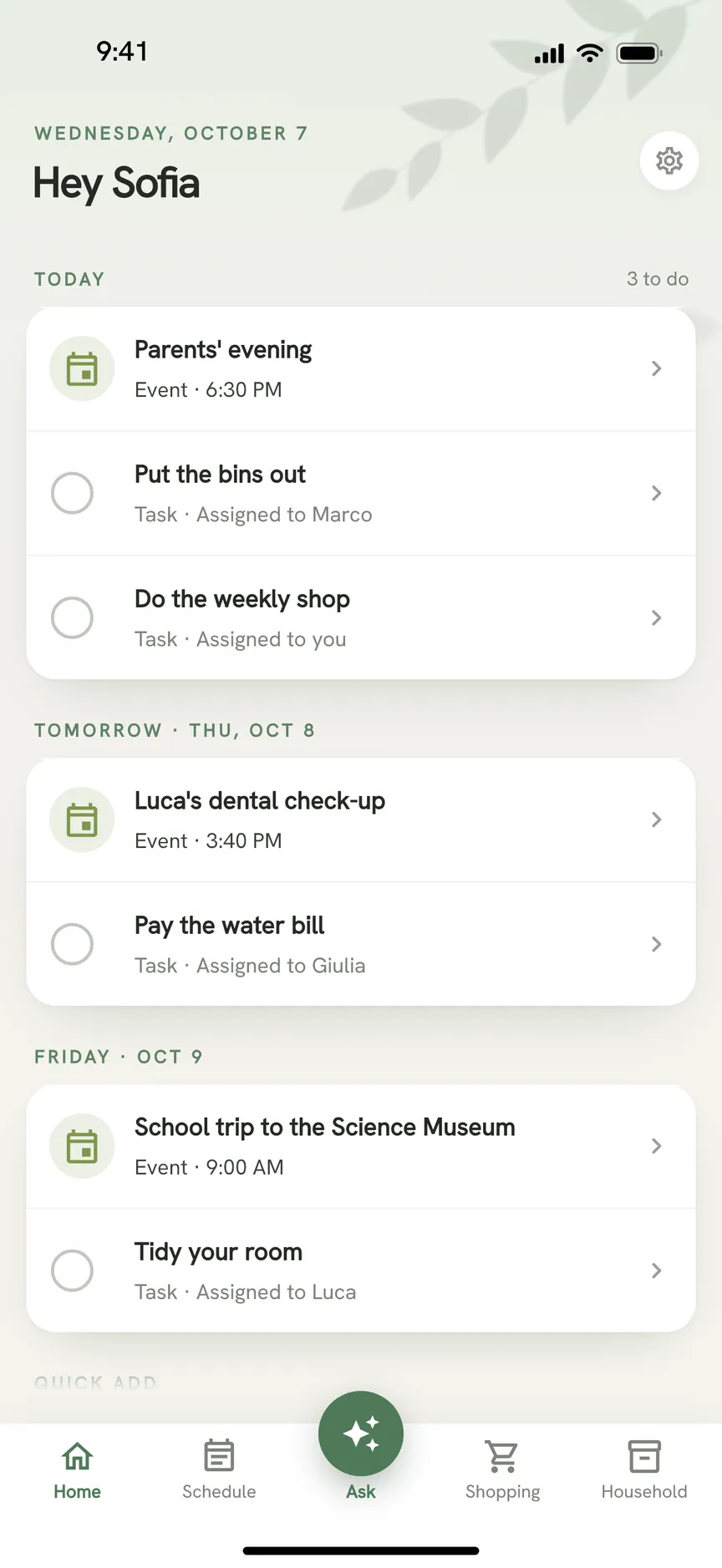
OneHaus runs on iPhone, iPad, Apple Watch and Android, so a household with mixed phones can use one app. It syncs with the calendar on your phone, including the iCloud calendar on an iPhone. Events flow from OneHaus to the phone by default. Switch sync to two-way and OneHaus also reads events from the phone calendar you pick, either keeping them on your own device or sharing them with the household.
You can connect an email inbox and OneHaus suggests bills, bookings and appointments for you to add or dismiss. Email inboxes are part of OneHaus Pro, and every household starts with a 30 day free trial. After the trial, one household subscription covers everyone who lives there.
Feature comparison
| Feature | Apple Family Sharing | OneHaus |
|---|---|---|
| Shared calendar | Family calendar, created automatically for the group | Shared household calendar with month view and agenda, events from a photo, PDF or connected inbox, and holiday feeds |
| Shared to-do list | Family list in Reminders | Tasks with due dates, recurring schedules and assignment |
| Group size | You plus up to five others | One household subscription covers everyone who lives there |
| Chore rotation | Not described on Apple's pages | Built-in rotation across household members |
| Shopping lists | A Reminders list can serve as one | Aisle-sorted lists synced across devices |
| Meal planning | Not described on Apple's pages | Meal planning and recipes, with ingredients added to lists |
| Home inventory | Not described on Apple's pages | Appliances, vehicles, pets, warranties and documents |
| Shared subscriptions and purchases | Yes | No |
| AI assistant | Not described on Apple's pages | Ask OneHaus, for typed and spoken requests, photos and PDFs |
| Platforms | Set up on Apple devices | iPhone, iPad, Apple Watch and Android |
| Price | No charge for the Family calendar or list that we found, and shared subscriptions keep their own prices | 30 day trial, then one household subscription |
Key differences
Built in versus built for the job
Family Sharing is not a household app. It is a way to share Apple services, and the calendar and Reminders list are two of the things it sets up for you. That makes them easy. Nobody downloads anything, and the Family calendar is already in Calendar when the group exists.
OneHaus is built around running the home. A task with a due date shows up in the same agenda as the events, a chore can rotate to the next person without anyone reassigning it, and the shopping list is sorted the way the shop is laid out.
Everyone on Apple, or not
Apple's setup steps are for iPhone, iPad and Mac. If every adult and teenager in your house has an Apple device, that is no obstacle. If one of you has an Android phone, you should check carefully before relying on it, because Apple's pages do not tell us how that member would take part.
OneHaus runs on Android and Apple devices, so mixed households end up in the same app.
Reminders as a shopping list
A shared Family list in Reminders can do for a short shopping list. Anyone in the family can add to it, and it needs no extra app. What it does not do is sort by aisle, hold several lists with their own history, or connect a meal plan to the list.
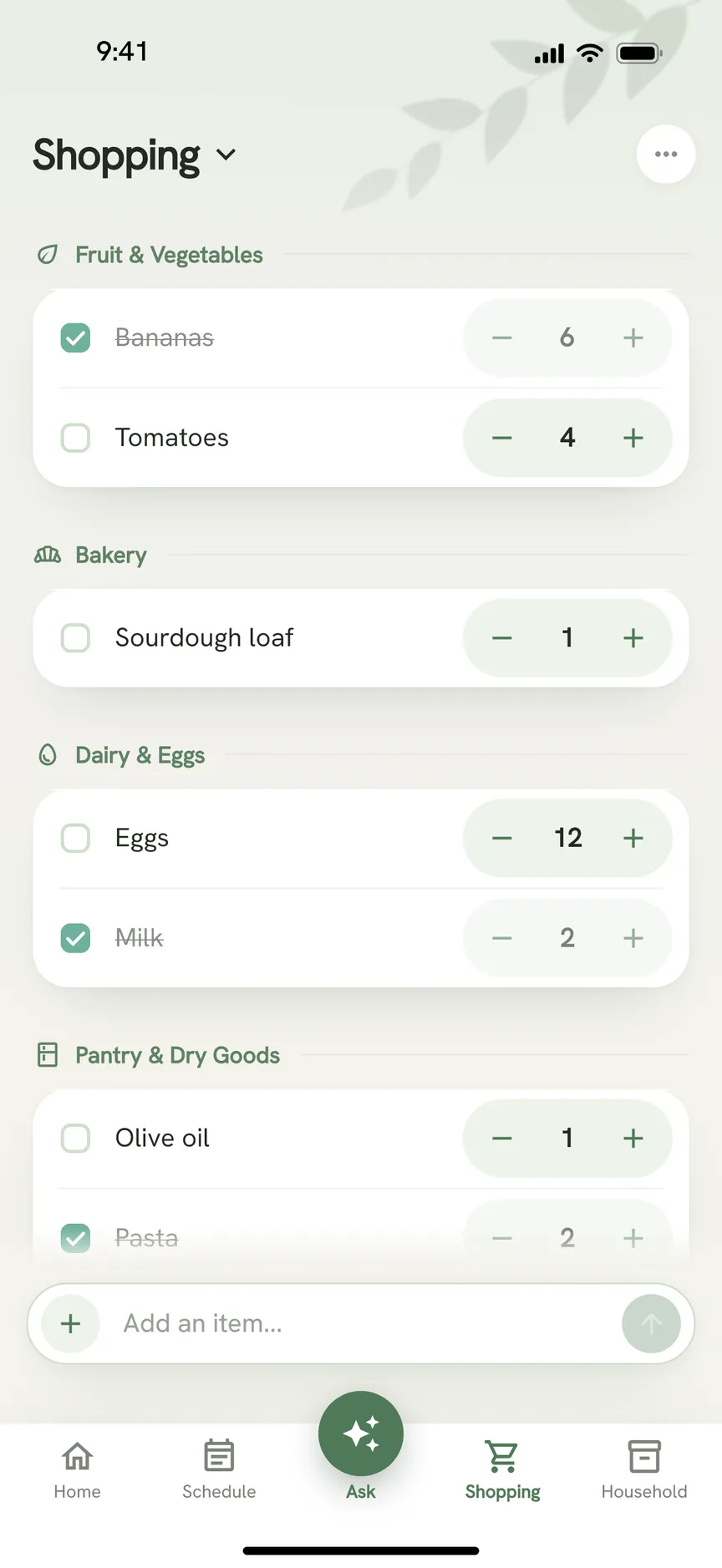
OneHaus keeps several lists, sorts items into aisles and remembers when you move an item to a different category. Ingredients from a recipe go onto a list. Updates from other members appear live, with no need to pull down to refresh.
Setting it up
The sharing steps for Apple's Family calendar are already covered. See how to share a calendar on iPhone for the steps, and how to share a Google Calendar on iPhone if some of you use Google.
Where Apple Family Sharing works better
We found no charge for the calendar or the Reminders list. They come with the family group you may already have set up for subscriptions.
It is built into the apps already on the phone. The Family calendar appears in Calendar and the Family list appears in Reminders, so there is nothing new to learn.
Family Sharing also shares things OneHaus does not touch, such as Apple subscriptions, App Store and Apple Books purchases, iCloud storage and a family photo album. If that is why you set up the group, the calendar is a free extra.
For an all-Apple household with simple scheduling needs, it can be all you need. If you do not have a chore, meal or inventory problem, you do not need to solve one.
Where OneHaus works better
OneHaus works on Android and Apple devices, so no member of the household is left out because of the phone they own.
Chores rotate automatically. Recurring tasks cycle through household members, which a shared list in Reminders does not do on its own.
Shopping lists sort by aisle, and meal planning and recipes feed them.
Home inventory holds appliances, vehicles, pets, warranties and documents next to the calendar and tasks.
Ask OneHaus lets you add things by describing them, or by sharing a photo, PDF or message from another app. Email inboxes, part of OneHaus Pro, suggest bills, bookings and appointments from a connected inbox.
OneHaus can also subscribe your shared calendar to public holidays for 63 countries, and to any .ics or webcal feed such as school term dates.
Who should choose Apple Family Sharing
Apple Family Sharing suits households where everyone is on Apple devices, a shared calendar and a shared to-do list are enough, and spending nothing matters. If you already share subscriptions and storage through a family group, using its calendar and Reminders list takes no extra effort.
Who should choose OneHaus
OneHaus suits households where the calendar is not the hard part. If you argue about whose turn it is, buy the same thing twice because the shopping list lives in two places, or cannot find the warranty when the washing machine breaks, a household app helps more than a shared calendar.
It also suits households with a mix of iPhone and Android, since everyone can use the same app. And it keeps working next to Apple's calendar, because OneHaus syncs with the calendar on your iPhone.
Frequently asked questions
What is Apple Family Sharing?
It is Apple's way of sharing subscriptions, purchases, iCloud storage and a photo album with up to five other people (Apple Support, checked October 2026). It also creates a shared Family calendar and a Family Reminders list (Apple Support, checked October 2026).
Is there a shared Apple calendar for the family?
Yes. When you set up Family Sharing, Apple creates a shared calendar called Family in the Calendar app on all family members' devices (Apple iPhone User Guide, checked October 2026). To use it, choose Family as the calendar when you add an event. The steps are in how to share a calendar on iPhone.
Is Apple Family Sharing free?
Apple's Family Sharing page says family members get access to your subscriptions at no extra cost (checked October 2026). We found no charge for the Family calendar or Reminders list. The subscriptions themselves, such as Apple Music or iCloud+, have their own prices. OneHaus has a 30 day trial, then one household subscription.
Can Android users join Apple Family Sharing?
We could not confirm this on Apple's pages, so we cannot say. Apple's setup instructions are written for iPhone, iPad and Mac. OneHaus runs on iPhone, iPad, Apple Watch and Android.
Does OneHaus work with the Apple Calendar?
Yes. OneHaus syncs with the calendar on your iPhone, including iCloud calendars. Sync is one-way by default, from OneHaus to the phone. Switch to two-way and OneHaus also reads events from the calendar you choose.
Can I use the Family Reminders list as a shopping list?
You can add items to the shared Family list in Reminders and the rest of the family sees them (Apple Support, checked October 2026). OneHaus has aisle-sorted shopping lists that connect to meal planning.
Try OneHaus free
If the Family calendar covers your dates but chores, shopping and meals are still scattered, give OneHaus a try. It is free to download on iPhone, iPad, Apple Watch and Android with a 30 day trial, and it syncs with the Calendar app you already use.
Download OneHaus to get started.