Digital Wall Calendar: A 2026 Buyer's Guide for Families
A digital wall calendar is a mounted touchscreen showing your family's shared schedule. See the best options, real prices, and whether an app does the same job.
Shared CalendarsA digital wall calendar is a wall-mounted touchscreen that shows your whole family's shared schedule in one always-on view, usually in the kitchen or hallway. If you want a glanceable "command centre" on the wall and do not mind spending $300 to $700 or more, a dedicated display is lovely; if you mostly want everyone on the same schedule for free, a shared calendar app on the phones you already own does the same core job without the hardware.
That is the honest verdict. The rest of this guide explains what these displays actually do, walks through the main options with real 2026 prices, and helps you decide whether a screen on the wall is worth it or whether an app is enough.
What is a digital wall calendar?
A digital wall calendar is a smart display that hangs on your wall and shows a shared family calendar, alongside extras like chore charts, to-do lists, meal plans and a photo screensaver. Instead of a paper wall planner you write on with a pen, it pulls events in automatically from calendars you already keep, such as Google Calendar, Apple Calendar (iCloud) and Outlook, and updates itself when anyone changes something.
You will see the same thing sold under several names. "Electronic wall calendar", "digital family calendar", "smart calendar display" and "family command centre" all describe the same category, and manufacturers use them more or less interchangeably. The only distinction worth caring about is whether a product is a purpose-built calendar device, a general smart display that can show a calendar, or software that turns a screen you already own into one. Those three routes are what the next section compares.
The appeal is simple: the week is visible to everyone the moment they walk past. Nobody has to unlock a phone, open an app or ask "what have we got on Saturday?" A well-placed display in a busy kitchen becomes the household's shared brain, and for a lot of families that ambient, no-effort visibility is exactly the point.
The trade-offs are just as real. These are dedicated devices that cost real money, many charge an ongoing subscription on top, and they live in one fixed spot, so the view does not travel with you when you leave the house.
The main digital wall calendar options in 2026
There are three broad routes to a shared family calendar on a screen: a purpose-built family display, a customisable smart-display board, or a general-purpose smart speaker with a screen. Here is how the popular options compare.
| Option | What it is | Rough price (checked July 2026, Skylight September 2026) | Best for |
|---|---|---|---|
| Skylight Calendar | 15" touch screen family calendar with chores, lists and meal planning | About $299.99 one-off for the 15" model (Calendar 2, includes one free month of Plus), plus a Plus plan at $79/year after that | Families who want the most polished, plug-and-play wall calendar |
| Hearth Display | 27" premium touchscreen "family command centre" with routines and chores | About $599 to $699 for the hardware, plus a membership from roughly $9/month | Larger households wanting a big, feature-rich hub and happy to pay a subscription |
| DAKboard | Customisable smart display for calendar, photos, weather and news | About $599.95 for the 21.5" touch wall display, with a free tier and premium plans around $5 to $10/month | Tinkerers who want to design their own dashboard layout |
| Cozyla Calendar+ 2 | Touchscreen family calendar in 15.6", 24" and 32", with chore charts, rewards and a voice assistant | Roughly $750 to just over $1,000 depending on size, with no subscription | Households who want the biggest screen and refuse to pay a monthly fee |
| Dragon Touch Digital Calendar | Touchscreen calendar and chore chart, wall or desk mountable, sold in sizes from 10" to 24" | About $349.99 for the 15.6" model, with no subscription | The cheapest way into a purpose-built display without an ongoing fee |
| Amazon Echo Show | General smart display with Alexa that can show a calendar | Around $150 to $180 for the Echo Show 8, often less in sales | Anyone who wants a cheap screen that also does Alexa, timers and video calls |
| Cozi (app) | Free shared family calendar app for phones and tablets | Free, with Cozi Gold around $39/year to remove ads and unlock month view | Families wanting a shared calendar with zero hardware cost |
| OneHaus (app) | Shared household app: calendar, tasks, shopping and home inventory | Free to download, 30-day trial, then one household subscription | Families who want the shared calendar plus chores and shopping on the phones they already carry |
Prices and specs above are taken directly from each brand's own product page as of the checked date, not third-party listings, since sale prices and bundled plans change often and that is where roundup articles tend to go stale.
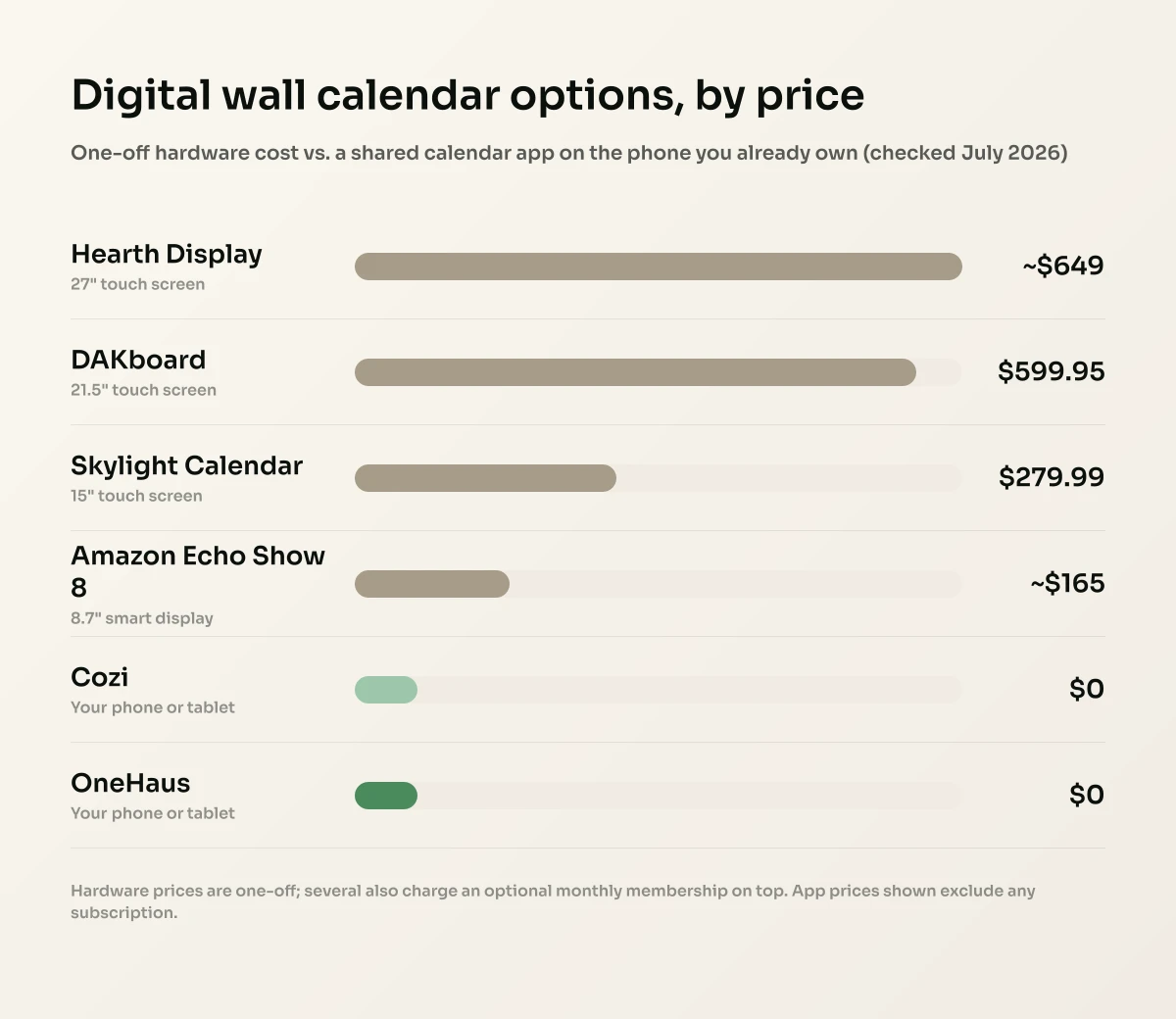
A few things stand out. The dedicated displays are the "proper" wall calendars and also the expensive ones, running from around $300 for a Skylight up to $1,000 or so for the largest Cozyla, before you add any subscription. The Echo Show is far cheaper because it is a general smart display first and a calendar second, so its calendar view is more of a bonus than a purpose-built feature. And the two apps do the scheduling job for little or nothing, on hardware you already own.
The subscription question splits this table more sharply than price does. Skylight, Hearth and DAKboard all sell a plan on top of the hardware, so the sticker price is not the whole cost: a $599 display on a $9/month membership is over $700 in year one and over $800 by year two. Cozyla and Dragon Touch lead on charging nothing beyond the device, which is why they show up so often in "no subscription" searches, and it is worth weighing a higher one-off price against a lower one that keeps billing. Work out the three-year cost of each option before you decide, because that is where these products genuinely diverge.
What size digital wall calendar do you need?
Screen size is the specification people get wrong most often, because a wall calendar is read from across a room rather than from arm's length. The category runs from about 10 inches at the small end (the entry Dragon Touch models) up to 32 inches at the top (the largest Cozyla), with most of the market clustered around 15 to 16 inches (Skylight, the common Dragon Touch and Cozyla sizes), 21 to 24 inches (DAKboard's wall display and the mid Cozyla and Dragon Touch models) and 27 inches (Hearth, and DAKboard's larger touch model).
The practical test is where the screen will hang and how far away you will be when you actually read it. A 15" panel is comfortable when you are within a couple of paces, which suits a worktop, a hallway shelf or a narrow galley kitchen. Once you are reading it from the far side of a kitchen-diner, a month grid on a 15" screen becomes a squint, and that is the point at which a 22" or 27" panel earns the extra money. If the main audience is young children, remember they will be reading it from lower down and often from further back.
Two things soften the size decision. First, layout matters as much as inches: a week or agenda view with fewer, larger entries reads from much further away than a dense month grid on the same panel, so a smaller screen set to the right view can outperform a bigger one set badly. Second, "large digital calendar for wall" often really means "readable from where I stand", and the cheapest way to find out what that needs is to mock it up before you buy. Print your current week at the size you are considering, tape it where the screen would go, and see whether you can read it from the doorway.
Turn a monitor or TV into a digital wall calendar
If you already have a spare monitor, TV or tablet, you do not have to buy a purpose-built device at all. Several of these platforms are web-based, so anything that can display a full-screen browser can become the calendar.
DAKboard is the clearest example: it is a customisable dashboard that runs in a browser, so you can point a spare monitor, a wall-mounted TV or a small computer such as a Raspberry Pi at it and get the same screen the dedicated hardware shows. DAKboard also sells its own small CPU units for people who would rather not assemble anything. It connects to Google Calendar, Apple iCloud, Microsoft Outlook and Office 365, and to any calendar that publishes an ICS or iCal feed, which is what makes it the usual answer when someone wants an Outlook calendar on a wall monitor. DAKboard has a free tier, with premium plans in the region of $5 to $10 a month (checked July 2026).
The other low-effort route is a tablet you have already replaced. An old iPad or Android tablet in a wall mount, running a shared calendar app with the screen set to stay awake, gives you most of the always-on effect for the price of the mount. It will not look as tidy as a purpose-built panel, and you will need a charging cable reaching the spot, but it is the cheapest way to find out whether your household actually uses a wall screen before spending several hundred on one.
Be honest about the trade-offs of the DIY route. You are responsible for mounting, cable management and keeping the thing powered and awake, and a repurposed TV in a kitchen is a lot of screen for a calendar. What you get in exchange is near-zero hardware cost and the freedom to change your mind.
Dedicated screen versus a shared app: the real trade-off
This is the decision that actually matters, so it is worth being blunt about it. A dedicated wall display and a shared calendar app are solving the same problem (one household, one schedule, everyone in sync), just in different places.
A physical screen wins on ambient visibility. It sits on the wall, always on, showing the week to anyone who walks past, no phone required. That is genuinely useful for young kids who do not have phones, for grandparents, and for the "grab-and-go" glance on the way out of the door. If your household lives in the kitchen, a good display can become the heart of the home's admin.
An app wins on cost, reach and portability. The same shared calendar, tasks and shopping list live on the phones, tablets and watches everyone already carries, so there is nothing extra to buy, mount or power. It travels with you, so you can check Saturday's fixtures from the touchline or add a dentist appointment from the waiting room, not just when you are standing in the kitchen. And updates reach everyone the next time their app checks in, wherever they are.
A wall display is a lovely "nice to have" for at-a-glance visibility at home, but it is one more device to buy, mount, power and (often) subscribe to. An app gives you the same shared schedule for far less, on screens you already own, and it comes with you when you leave the house. Plenty of families are best served by the app alone; some want both, using an app as the source of truth and a cheap display as a kitchen window onto it.
Where OneHaus fits
OneHaus is a shared household app, not a wall display, and that is a deliberate choice. It puts the same shared family calendar on the phones, tablets and watches everyone already has, and adds the rest of the household admin the fixed displays only partly cover.
With OneHaus your household gets one shared calendar that writes household events out to Apple Calendar or Google Calendar on your phone by default, with two-way sync available if you want events from that calendar read back in, so work meetings and school dates sit side by side. On top of the calendar you get chores and tasks with automatic rotation (so the same person is not always emptying the bins), collaborative shopping lists that sort themselves into aisle order, meal planning, and a home inventory for appliances, warranties, documents and subscriptions. An AI assistant lets anyone add things in plain language, so you can type or say "dentist Tuesday at four" instead of tapping through menus.
Because it runs on iPhone, iPad, Apple Watch and Android, the shared view is with every family member wherever they are, not stuck on one wall. If you later decide you do want a screen in the kitchen too, an old tablet propped in a stand running the app gives you a lot of the always-on effect for the price of a stand. OneHaus is free to download with a 30-day free trial, then a single household subscription covers everyone who lives together, with no per-person fee.
Where a dedicated display genuinely wins is that permanently-on, no-touch presence on the wall, especially for young children who cannot use a phone. If that ambient hallway view is the whole reason you are shopping, a Skylight or Hearth will scratch an itch an app cannot. For most families, though, getting everyone onto one shared schedule matters far more than which surface it appears on, and the phones in everyone's pockets are the surface they will actually check.
How to choose the right option for your family
Work through these questions before you spend anything:
- Do you actually need a screen on the wall, or just a shared schedule? If it is the shared schedule you are after, start with a free or low-cost app. You can always add hardware later.
- What is your real budget? Remember to add any subscription to the sticker price. A $599 display with a $9/month membership is over $700 in year one.
- Who needs to see it? If phone-less kids or grandparents are the main audience, a wall display earns its keep. If everyone has a phone, an app reaches them all for less.
- Do you need it when you are out? School pickups, fixtures and appointments often need checking away from home. Only an app travels with you.
- How much more than a calendar do you want? If you also want chores, shopping and home admin in one place, weigh that in. A shared family calendar is one piece of the household puzzle, and some tools cover far more of it than others.
If you are still weighing up app options specifically, our roundup of the best shared family calendar apps for 2026 compares the leading choices in detail. And if you simply want to get everyone onto an existing calendar first, how to share a calendar on iPhone walks through it step by step.
Frequently asked questions
What is a digital wall calendar?
A digital wall calendar is a wall-mounted touchscreen that displays your family's shared schedule in an always-on view, usually in a kitchen or hallway. It pulls events automatically from calendars like Google Calendar, Apple Calendar and Outlook, and often adds chore charts, to-do lists and a photo screensaver, so the whole household can see the week at a glance without unlocking a phone.
How much does a digital wall calendar cost?
Dedicated family displays typically cost between about $150 and $1,000 for the hardware (checked July 2026). A Dragon Touch calendar is about $349.99 for the 15.6" model, a Skylight Calendar is around $299.99 for the 15" model (checked September 2026), a Hearth Display runs roughly $599 to $699, a DAKboard wall display is about $599.95, and a Cozyla Calendar+ 2 ranges from roughly $750 to just over $1,000 depending on size, while a general-purpose Amazon Echo Show 8 is around $150 to $180. Several of the dedicated displays also charge a subscription on top, often between $5 and $10 a month, so compare the three-year cost rather than the sticker price.
Is there a digital wall calendar with no subscription?
Yes. Cozyla and Dragon Touch both sell their displays outright with no ongoing fee, which is the main reason to consider them over a Skylight or Hearth, and DAKboard has a free tier alongside its paid plans. The trade-off is usually a higher one-off price or a less polished companion app. If you want to avoid a recurring fee entirely and still get chores and shopping alongside the calendar, a shared household app on the phones you already own is the other route, since it removes the hardware cost as well as the subscription.
Do you need a digital wall calendar or is an app enough?
For most families, a shared calendar app is enough, because it puts the same schedule on the phones everyone already carries for little or no cost, and it travels with you when you leave the house. A dedicated wall display is worth the extra money mainly if you want an always-on view for young children or grandparents who do not use phones, or if you simply love having a physical family command centre in the kitchen.
What is the best digital family calendar?
The best digital family calendar depends on whether you want hardware or an app. For a purpose-built wall screen, the Skylight Calendar is the most polished plug-and-play option, and the Hearth Display is the premium big-screen choice. For a shared calendar plus chores, shopping and home admin on the phones you already own, an app such as OneHaus or Cozi does the job without buying a device.
Can I use a normal tablet as a digital wall calendar?
Yes. An old iPad or Android tablet in a wall mount or stand, running a shared calendar app, gives you much of the always-on wall-display effect for the price of a stand rather than a dedicated device. It will not be as tidy or purpose-built as a Skylight or Hearth, but it is a cheap way to test whether you actually want a screen on the wall before spending hundreds.
What size digital wall calendar should I get?
Match the size to your reading distance, not to the biggest number you can afford. Around 15 inches is comfortable when you read it from a pace or two away, such as on a worktop or in a narrow kitchen. Step back to the far side of a kitchen-diner and a 15" month grid gets hard to read, which is where the 22" and 27" panels justify their price. The view you choose matters as much as the panel: a week or agenda layout with fewer, larger entries reads from much further away than a dense month grid on the same screen.
Can I use a monitor or TV as a digital wall calendar?
Yes, and it is the cheapest route if you already own the screen. Web-based dashboards such as DAKboard run in a full-screen browser, so a spare monitor, a wall-mounted TV or a small computer like a Raspberry Pi can show the same dashboard the dedicated hardware does. DAKboard connects to Google Calendar, Apple iCloud, Microsoft Outlook and Office 365, plus any calendar with an ICS or iCal feed, which is why it is the usual answer for putting an Outlook calendar on a wall monitor. The trade-off is that mounting, cabling and keeping the screen awake are your job.
Is an electronic wall calendar the same as a digital wall calendar?
Yes. "Electronic wall calendar", "digital family calendar", "smart calendar display" and "family command centre" are all marketing names for the same category of wall-mounted screen showing a shared schedule. The distinction that actually matters is not the name but the type: a purpose-built calendar device, a general smart display that can show a calendar, or software that turns a screen you already own into one.
Do digital wall calendars sync with Google and Apple calendars?
Most dedicated digital wall calendars sync with the major calendar services, including Google Calendar, Apple Calendar (iCloud) and Outlook, so your existing events appear automatically. Shared apps do the same: OneHaus writes household events out to Apple Calendar or Google Calendar by default, and turning on two-way sync imports events from that calendar into the shared household calendar, so you do not have to retype anything.
Try OneHaus
If the real goal is getting your whole household onto one shared schedule, you do not need to buy a screen to do it. Download OneHaus to put a shared family calendar, chores with automatic rotation, aisle-sorted shopping lists and a home inventory on the phones everyone already carries. It works on iPhone, iPad, Apple Watch and Android, and it is free to download with a 30-day trial, then one household subscription covers everyone who lives together.