Best Ollie AI Alternatives (2026): 5 Apps After the Shutdown
Ollie shut down on 6 November 2026. Its farewell letter says Ollie would text each user an export of their data, and that subscriptions to Ollie and Ollie for Meals are cancelled with a refund for unused months. If your household ran its calendar, school emails and dinners through an Ollie group chat, you need something else. This guide compares five apps that cover what Ollie did. Competitor details come from each app's own site, App Store listing or pricing page, checked between June and October 2026.
What Ollie did, and what to look for
Ollie was a text-based family assistant. Families used it for a handful of jobs, and most replacements cover some of them, not all:
- Calendar. Ollie read and wrote to your Google or Apple calendar. Those events are still there, so pick an app that can read that calendar.
- School email. Ollie read Gmail and pulled out dates. Check whether a replacement connects to your inbox or waits for you to forward each email.
- Reminders and lists. Ollie held to-dos and shopping by chat. An app gives you lists you can open and scan.
- Meals. Ollie began as a meal planner. If dinner was the main reason you used it, weight meal planning heavily.
- No app. This is the part nobody on this list replaces. Every option below is an app you open.
The 5 best Ollie alternatives
1. OneHaus: best for running the whole household
OneHaus is a household app with a shared calendar, tasks with rotation, shopping lists sorted by aisle, meal planning and recipes, home inventory, and an assistant called Ask OneHaus that takes plain language. It connects to a Gmail, iCloud, Yahoo, Outlook or other inbox and suggests events, tasks, contacts and bills for you to review, which covers Ollie's school email job.
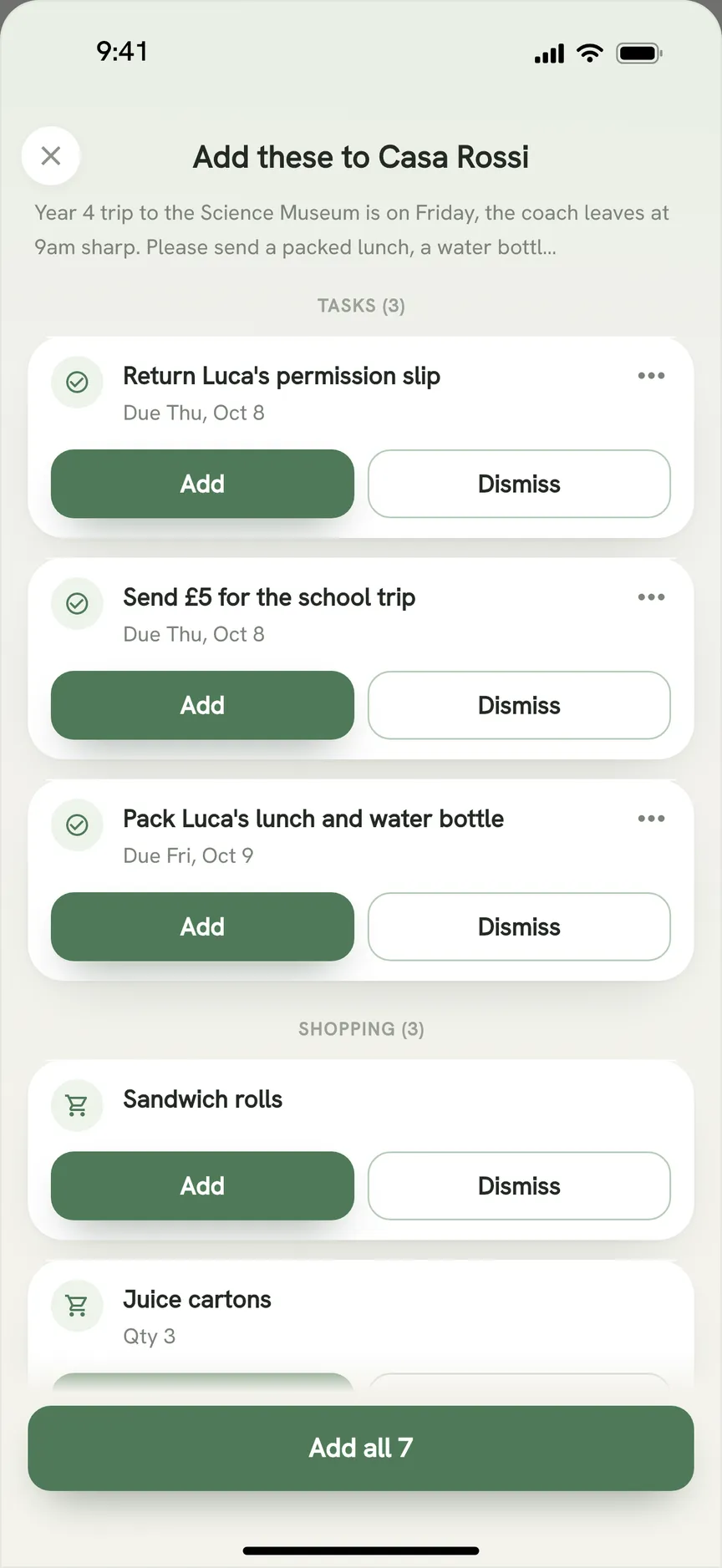
It is also the easiest place to land the export Ollie texts you. Share the message into OneHaus and it proposes tasks, events, shopping items and contacts from it. And while there is no texting, OneHaus Pro connects your household to ChatGPT, Claude and other assistants, so you can still ask questions from a chat app.
The gaps are the ones Ollie owners will notice: no SMS group and no morning briefing. It runs on iPhone, iPad, Apple Watch and Android, free for 30 days, then one household subscription covers everyone. Our OneHaus vs Ollie page has step-by-step switching notes.
2. Sense: closest AI family organiser with a free tier
Sense: AI Family Organizer pulls dates onto a shared family calendar from email, photos, screenshots, WhatsApp, PDFs, voice and the share sheet, and also does chores, shared lists, meal planning and recipes. Of the apps here, it covers the most of Ollie's ground.
Email works by forwarding: Sense "only reads what you share or forward", so it will not watch your inbox the way Ollie did. The free plan includes 10 AI actions a month, and the App Store lists Premium at $6.99 a month or $59.99 a year, which adds calendar sync with Google, iCloud and Outlook. It runs on iPhone, iPad, Apple Watch, Android and the web (checked October 2026). See OneHaus vs Sense.
3. Nuet: best if you only want dates on your existing calendar
Nuet reads Gmail, Outlook, iCloud and Yahoo, WhatsApp group chats, screenshots, voice notes and photos, then puts the events it finds into your Google, Outlook or iCloud calendar. If Ollie's job for you was "get the school dates out of my inbox", Nuet does that job and nothing else.
It has no chores, shopping lists or meal planning. Pricing is $6.99 a month for one account or $9.99 a month for a two-account Family plan, after a 7-day trial (Nuet pricing, checked October 2026). iOS and Android. See OneHaus vs Nuet.
4. Jam Family Calendar: best simple family calendar on iPhone
Jam is a shared family calendar with to-do and shopping lists. You forward an email to Jam and the events appear on the calendar, and it connects to Google and Apple calendars.
It does not mention chores or meal planning, and it is iPhone and iPad only. The App Store listing shows a family membership at $15.99 a month or $119.99 a year after a 30-day trial (checked October 2026). See OneHaus vs Jam.
5. Cozi: best if meals and the calendar were all you used
Cozi is the long-running family organiser: a colour-coded shared calendar, shopping and to-do lists, and a recipe box. The free tier carries adverts and shows only 30 days of calendar ahead. Its AI tools, including an AI Meal Planner and AI Event Import, are in Cozi Max at $79 a year (checked June 2026).
For an Ollie for Meals household that also wants a shared calendar, Cozi Max is the nearest match on this list. It has no chore rotation and no home inventory. iOS, Android and web. See OneHaus vs Cozi.
Ollie alternatives compared
| App | Reads email | Chores | Lists | Meals | Platforms | Price |
|---|---|---|---|---|---|---|
| OneHaus | Connects an inbox | Yes, with rotation | Yes, sorted by aisle | Yes | iPhone, iPad, Apple Watch, Android | 30-day trial, then one household subscription |
| Sense | Forwarded email | Yes | Yes | Yes | iPhone, iPad, Apple Watch, Android, web | Free (10 AI actions a month); Premium $59.99/year |
| Nuet | Connects an inbox | No | No | No | iOS, Android | From $6.99/month; 7-day trial |
| Jam Family Calendar | Forwarded email | No | Yes | No | iPhone, iPad | $15.99/month or $119.99/year; 30-day trial |
| Cozi | AI Event Import on Max | To-do lists | Yes | Recipes; AI Meal Planner on Max | iOS, Android, web | Free with ads; Max $79/year |
| Ollie (closed) | Gmail | Reminders | By chat | Yes | Text message | Metered per message |
How to choose
Pick for the job Ollie did most in your house:
- It ran everything. OneHaus covers the calendar, inbox, chores, shopping and meals in one app, and Sense is the alternative if you want a free tier and do not mind forwarding emails.
- It only fished dates out of email. Nuet puts them on the calendar you already use.
- It planned dinner. OneHaus plans the week from your saved recipes and sends the ingredients to the list. Cozi Max will draft a meal plan for you with AI.
- Everyone is on iPhone and you want a calendar. Jam keeps it simple.
Whichever you choose, find and keep the export Ollie texted you. It is the record of what Ollie knew about your household.
Frequently Asked Questions
Has Ollie shut down?
Yes. Ollie's farewell letter says it was "sunsetting on Nov 6, 2026". Subscriptions to Ollie and Ollie for Meals are cancelled, with a refund for any partial or unused months.
Is there an AI family assistant that works by text like Ollie?
None of the five apps here works over SMS. OneHaus comes closest in a different way: OneHaus Pro connects your household to ChatGPT, Claude and other assistants, so you can ask about the calendar or add to the shopping list from a chat app you already use.
What is the best Ollie alternative for school emails?
OneHaus and Nuet both connect to your inbox and find dates without you forwarding anything. OneHaus also turns what it finds into tasks, contacts and bills. Nuet only adds events to your existing calendar. Sense and Jam need each email forwarded.
What replaces Ollie for Meals?
OneHaus plans meals from your saved recipes and its Discover collection and puts the ingredients on your shopping list. Sense also has meal planning and recipes. Cozi's AI Meal Planner, on the $79-a-year Max tier, is the option that drafts a plan for you.
Can I import my Ollie data into another app?
None of these apps imports Ollie data directly. Ollie said it would text you an export, and in OneHaus you can share that text into the app, which proposes tasks, events, shopping items and contacts from it for you to accept. Events Ollie added to your Google or Apple calendar stay there, and any of these apps that reads that calendar will pick them up.
Try OneHaus Free
If Ollie was your household's assistant, OneHaus gives you the calendar, inbox, chores, shopping and meals in one app, plus home records Ollie never kept. Download OneHaus on iPhone, iPad, Apple Watch or Android and bring your household across during the 30-day trial.