OneHaus vs Nori (2026): The Best Nori AI Alternative
Nori is an AI-powered family organiser built around multimodal input, letting you add events and tasks by voice, photo, or forwarded email. OneHaus takes a similar AI-first approach but adds home inventory and a privacy model built on a single household subscription rather than pay-as-you-go AI usage.
What is Nori?
Nori is an AI family organiser developed by Domus Next Inc. Its central idea is reducing the mental load of running a household by pulling schedules, tasks, meals, and shopping into one shared, AI-driven space.
Its standout feature is how you add information. Rather than filling in forms, you speak to Nori, snap a photo of a school flyer, or forward a confirmation email, and the AI works out what to do with it. It turns those inputs into structured calendar events and tasks, and can break a larger goal like planning a trip into sub-tasks assigned to the right family member.
Nori includes a shared family calendar that syncs two-way with Google Calendar, Apple Calendar, and Outlook, AI-generated tasks and chores, meal planning with recipe suggestions and automatic grocery lists, and shopping lists. It also offers reminders through push, SMS, and phone calls, and an emergency assistant for quick advice on common household situations. Family members such as grandparents, nannies, or co-parents can be added with specific permissions. Nori is available on iOS and Android.
Nori uses a freemium model. Its pricing philosophy is "free to organise, pay for power": the core tools (shared calendar, tasks, shopping lists, recipes) are free, while the advanced AI features (multimodal input, complex task automation, real-world reservations) run on a pay-as-you-go basis. New users get 10 free AI interactions to start, after which AI usage is billed. A flat Nori Plus plan is also available, listed on the App Store at $7.99 per month or $59.99 per year, and when one family member upgrades, the whole family gets the paid features (pricing and AI allowances checked June 2026 on the App Store listing). The service is private, closed, and ad-free, and Nori states it does not sell your data.
What is OneHaus?
OneHaus is an AI-powered household management app built for households that want more than a calendar and a couple of lists in one place. It brings tasks, a shared calendar, shopping lists with automatic aisle sorting, meal planning and recipes, home inventory, and an AI assistant into a single app.
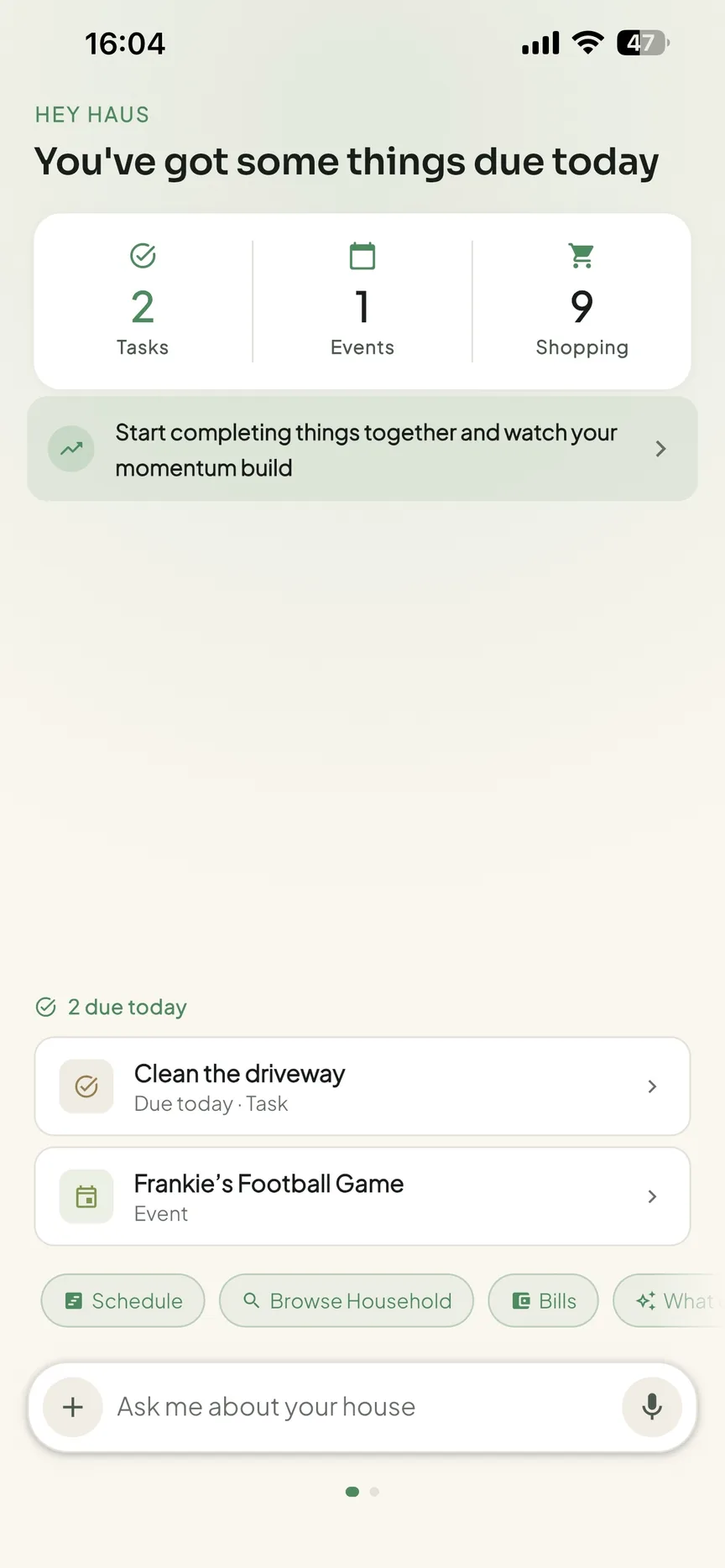
Tasks in OneHaus support recurring schedules and automatic rotation, so chores can be distributed fairly across household members without manual reassignment each week. The AI assistant understands natural language, so you can add tasks, shopping items, and calendar events by describing them rather than filling in forms. The shared calendar syncs with both Apple Calendar and Google Calendar. Home inventory lets you log appliances, vehicles, pets, warranties, and documents in one place.
OneHaus is available on iPhone, iPad, Apple Watch and Android, and through connected AI assistants. It's built with a privacy-first approach, keeping household data secure and not using it for advertising. OneHaus is free to download with a 30-day trial, after which one household subscription covers everyone who lives there.
Feature Comparison
| Feature | Nori | OneHaus |
|---|---|---|
| AI assistant | Voice, photo, and email input | Natural language input and AI assistance |
| Shared calendar | Yes, with two-way Google, Apple, and Outlook sync | Shared household calendar |
| External calendar sync | Google, Apple, and Outlook (two-way) | Apple Calendar and Google Calendar |
| Tasks and chores | AI-generated tasks, assigned per member | Tasks with recurring schedules and automatic rotation |
| Chore rotation | Not described | Built-in rotation across household members |
| Shopping lists | Yes, with grocery generation from meals | Aisle-sorted lists synced across devices |
| Recipes and meal planning | Yes, with AI suggestions and grocery lists | Meal planning and recipes, with ingredients added to lists |
| Home inventory | Not available | Appliances, vehicles, pets, warranties, and documents |
| Reminders | Push, SMS, and phone calls | Yes |
| Platforms | iOS and Android | iPhone, iPad, Apple Watch, Android, and connected AI assistants |
| Pricing | Core free, AI pay-as-you-go, Plus $7.99/mo or $59.99/yr | 30-day trial, then one household subscription |
Key Differences
How You Pay for AI
This is the clearest difference between the two apps. Nori's core organising tools are free, and the AI features that make it distinctive run on a pay-as-you-go model. After 10 free AI interactions, you pay for usage, or take the flat Nori Plus plan listed at $7.99 per month or $59.99 per year (checked June 2026). That suits households that use the AI lightly and want to keep costs down, but heavy AI users can find the metered model harder to predict.
OneHaus takes the opposite approach. There's a 30-day trial, then a single household subscription that covers everyone. The AI assistant isn't metered separately, so the cost is the same whether you lean on it occasionally or every day. For households that want to make natural language the default way they add things, a predictable single price removes any hesitation about using the AI.
Multimodal Input vs Natural Language
Nori leans heavily into multimodal capture. Speaking, photographing a flyer, or forwarding an email are all first-class ways to get information into the app, and that breadth of input is a genuine strength.
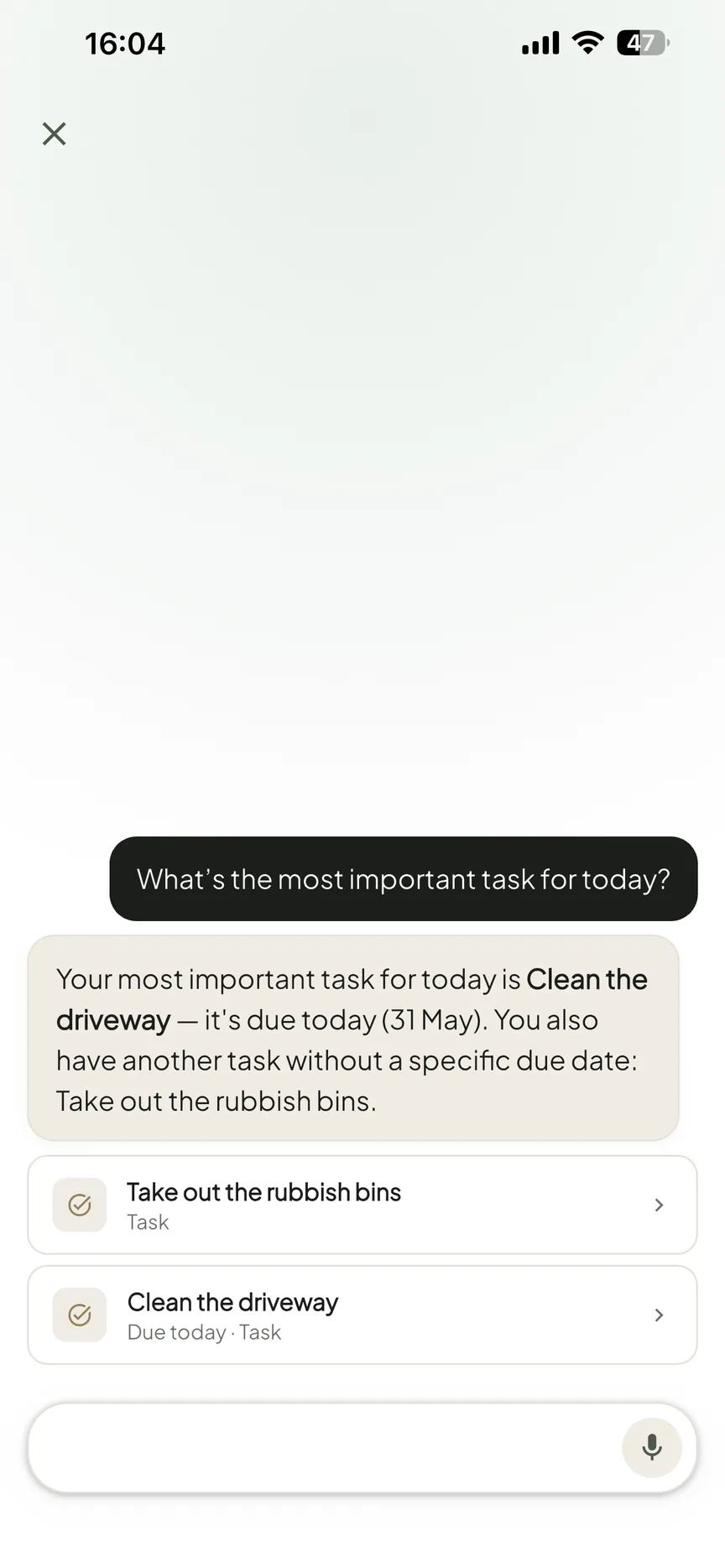
OneHaus focuses on conversational natural language. You describe what you need, such as adding pasta to the shopping list or scheduling a boiler service for next month, and the assistant routes it to the right place. The emphasis is on fast, low-friction capture through plain language rather than a wide set of input formats. When we tested both, Nori's photo and email capture was the wider net, while OneHaus's single text box was the quicker path for the everyday "just add this" moments.
Home Inventory
Nori is built around calendar, tasks, meals, and shopping. It does not offer a home inventory feature.
OneHaus adds home inventory alongside the rest. You can log appliances, vehicles, pets, warranties, and documents in the same app your household already uses for tasks and the calendar. For households that want to keep track of what they own and when things expire or need servicing, that's an area Nori doesn't cover.
Platforms and Calendar Sync
Nori is a mobile-first product available on iOS and Android, with two-way calendar sync to Google Calendar, Apple Calendar, and Outlook. That two-way Outlook sync is notable, since many family apps only sync Outlook one-way or not at all.
OneHaus is available on iPhone, iPad, Apple Watch and Android, and through connected AI assistants, and syncs with Apple Calendar and Google Calendar. Both apps cover Apple and Google calendars, and both now run on iPhone and Android, so the real coverage differences are elsewhere: if your household relies on Outlook, Nori has the edge, while if you want access through a connected AI assistant, OneHaus fits better.
Where Nori Works Better
Nori's multimodal input is broader than OneHaus's. The ability to forward a confirmation email or photograph a school flyer and have the app turn it into events and tasks is a strong capture workflow, and not every app does it well.
Two-way Outlook calendar sync is a real advantage for households that live in Outlook for work. Combined with two-way Google and Apple Calendar sync, Nori covers a broad mixed-calendar setup that trips up a lot of family apps.
Android availability matters if your household isn't all on iPhone. Nori runs on both iOS and Android, so everyone can be on the same app regardless of phone.
The free core tier lets a household try the calendar, tasks, shopping lists, and recipes at no cost, paying only when they reach for the advanced AI features. For light AI users, that can work out cheaper than a flat subscription.
Reminders through phone calls and SMS, alongside push, give Nori extra ways to make sure time-sensitive items don't get missed.
Where OneHaus Works Better
OneHaus covers home inventory, which Nori doesn't attempt. Logging appliances, vehicles, pets, warranties, and documents in the same app removes the need for a separate filing system or scattered spreadsheets.
Task rotation solves a common household problem with no ongoing effort. Once chores are configured, they cycle through household members automatically. Nori assigns AI-generated tasks to members, but built-in recurring rotation is a distinct OneHaus strength.
Aisle-sorted shopping lists that sync across devices make the actual shop quicker, ordering items the way you walk the aisles rather than the order they were added.
The pricing model is predictable. A single household subscription covers everyone with no separate AI metering, so households can use the AI assistant as much as they like without watching a usage counter.
Connected AI assistant access gives OneHaus reach beyond the phone. If you'd rather interact through an AI assistant you already use, OneHaus supports that.
Like Nori, OneHaus is ad-free and privacy-first, keeping household data secure and out of advertising.
Who Should Choose Nori
Nori is a good fit for households that want a free core organiser and only want to pay for AI when they actually use it. If your AI needs are light and occasional, the pay-as-you-go model can keep costs low.
It also suits households on a mix of iPhone and Android, those who depend on two-way Outlook calendar sync, and anyone who values forwarding emails and photographing documents as a primary way to capture information. Reminders by phone call and SMS are an added draw for families who worry about missing time-sensitive items.
Who Should Choose OneHaus
OneHaus suits households that want a single app for tasks, calendar, shopping, recipes, and home inventory, with AI assistance running across all of it. If you're tracking what you own, when warranties expire, and when vehicles or appliances need servicing, the home inventory fills a gap most family apps leave open.
It's also the better choice for households that want predictable pricing rather than metered AI, where chore rotation matters, and where connected AI assistant access is a priority. For households that want natural language to be the default way they add things, without watching a usage counter, OneHaus is designed for exactly that.
Frequently Asked Questions
How much does Nori cost?
Nori's core tools (calendar, tasks, shopping lists, recipes) are free, and the advanced AI features run pay-as-you-go after 10 free AI interactions. A flat Nori Plus plan is listed on the App Store at $7.99 per month or $59.99 per year, and one upgrade covers the whole family (checked June 2026). OneHaus has a 30-day trial, then a single household subscription with no separate AI metering.
Does Nori sync with Apple Calendar?
Yes. Nori's App Store listing states it syncs two-way with Google Calendar, Apple Calendar, and Outlook. OneHaus syncs with Apple Calendar and Google Calendar, so both cover the two most common calendars; Nori adds Outlook on top.
Does Nori or OneHaus have home inventory?
Only OneHaus. It lets you log appliances, vehicles, pets, warranties, and documents in the same app you use for tasks and the calendar. Nori is built around calendar, tasks, meals, and shopping and does not offer a home inventory feature.
Which is better for heavy AI use?
OneHaus, on cost predictability. Nori bills AI usage by the interaction after the free allowance, so heavier use costs more, while OneHaus charges one household subscription regardless of how much you use the assistant. If your AI needs are light and occasional, Nori's pay-as-you-go model can work out cheaper.
Try OneHaus Free
If you're looking for a Nori alternative that covers tasks, calendar, shopping, recipes, home inventory, and AI in one app, give OneHaus a try. It's free to download on iPhone, iPad, Apple Watch and Android with a 30-day trial.