Best Skylight Alternatives (2026): 5 Options Compared
Skylight Calendar is a well-regarded 15" touchscreen family calendar with chores, lists and meal planning built in. But it's a dedicated piece of hardware costing $299.99, plus an optional Plus plan at $79 a year, and it only works from the one spot on the wall where it's mounted. This guide compares five Skylight alternatives, from cheaper dedicated displays to shared calendar apps that run on the phones your household already owns. Prices below were checked directly against each brand's own pricing page in September 2026.
Why Households Look for a Skylight Alternative
Skylight does its core job well: a bright, purpose-built touchscreen that shows the family's schedule, chores and lists at a glance, no phone required. The most common reasons households look elsewhere:
- The upfront cost. $299.99 for the 15" model is real money before you've decided whether a wall display suits your household at all. The larger Skylight Calendar Max is 27" and costs considerably more.
- An optional subscription on top. The Plus plan, $79 a year, unlocks extra features like meal planning and chore rewards.
- It's fixed to one spot. A wall display can't come with you to check Saturday's fixtures from the touchline or add an appointment from a waiting room.
- No home inventory or AI assistant. Skylight covers calendar, chores and lists, but not warranties, documents, or natural-language capture.
What to Look For in a Skylight Alternative
- Where you want the schedule to live. A wall, a phone, or both. Each has a real trade-off (see our full digital wall calendar buyer's guide).
- What it costs in year one, not just the sticker price. Add any subscription to the hardware cost before comparing.
- Whether it travels with you. Only an app does, by design.
- How much more than a calendar you want. Chores, shopping, home inventory and AI assistance vary a lot between options.
The 5 Best Skylight Alternatives
1. OneHaus: best free-to-start alternative on the phones you already own
OneHaus is a shared household app: calendar, tasks with automatic rotation, aisle-sorted shopping lists, home inventory and an AI assistant, all on iPhone, iPad, Apple Watch and Android. There's no hardware to buy, mount or power. Everyone gets the same shared view on the device already in their pocket, and it comes with you when you leave the house.
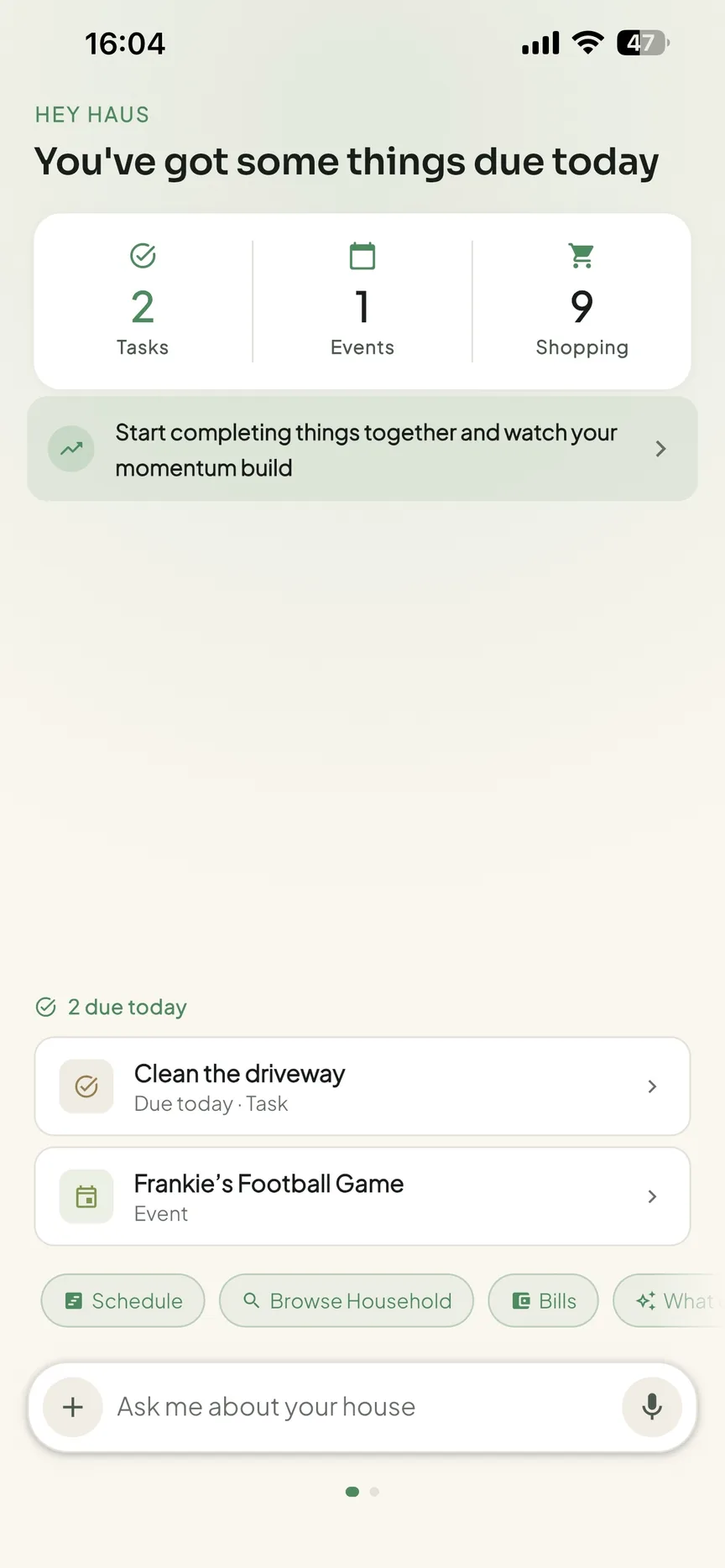
One honest trade-off: Skylight's always-on wall presence is genuinely useful for young children or grandparents who don't use a phone. If that ambient, no-touch view is the whole reason you're shopping, a dedicated display still has an edge there. For most households, getting everyone onto one shared schedule matters more than which surface it appears on. OneHaus is free to download with a 30-day trial, then one household subscription covers everyone. Download OneHaus.
2. Hearth Display: best for a bigger, premium wall display
Hearth Display is a 27" touchscreen "family command centre" with routines and chores, aimed squarely at the same always-on-wall use case as Skylight, just bigger. Hardware runs about $599 to $699, plus a membership from roughly $9 a month, so it's a step up in both screen size and price.
3. DAKboard: best for a customisable dashboard
DAKboard is a 21.5" touch wall display for calendar, photos, weather and news, priced around $599.95, with a free tier and premium plans around $5 to $10 a month. It suits households who want to design their own layout rather than a fixed family-calendar interface.
4. Cozi: best free calendar app
Cozi is a long-established shared family calendar app for phones and tablets, free to use with Cozi Gold around $39 a year to remove adverts and unlock the month view. It covers calendar and lists well but has no chore rotation, home inventory or AI assistant.
5. Amazon Echo Show: best if you already want a general smart display
An Echo Show 8 runs around $150 to $180 and shows a calendar alongside Alexa, timers and video calls. It's the cheapest screen option here, but the calendar is a bonus feature on a general smart display, not a purpose-built family organiser.
Skylight Alternatives Compared
| App | Type | Platforms | Price |
|---|---|---|---|
| OneHaus | App | iPhone, iPad, Apple Watch, Android | Free trial, then one household subscription |
| Hearth Display | Wall display | Dedicated hardware | ~$599-699 + ~$9/month |
| DAKboard | Wall display | Dedicated hardware | $599.95 + optional $5-10/month |
| Cozi | App | iOS, Android, web | Free; Gold ~$39/year |
| Amazon Echo Show 8 | Smart display | Dedicated hardware | ~$150-180 |
| Skylight Calendar (for reference) | Wall display | Dedicated hardware | $299.99 + optional $79/year |
How to Choose the Right Alternative
- You want the wall-display experience for less, or bigger. DAKboard is cheaper than Skylight for a similar-sized screen; Hearth is bigger and pricier.
- You want the calendar on the phones everyone already carries, for free to start. OneHaus covers calendar, chores, shopping and home inventory in one app, with no hardware to buy.
- You just want a free calendar app. Cozi covers the basics at no cost.
- You want a cheap screen that does more than a calendar. An Echo Show adds Alexa, timers and video calls to the mix.
Frequently Asked Questions
What is the cheapest Skylight alternative?
Among dedicated displays, DAKboard and Skylight itself are the closest in price, both around $280 to $600 depending on size. An Amazon Echo Show 8 is cheaper still, around $150 to $180, though its calendar view is a secondary feature. The cheapest option overall is a shared calendar app like OneHaus or Cozi, which need no hardware purchase at all.
Is there a free alternative to Skylight Calendar?
Yes. Shared calendar apps like OneHaus and Cozi run on the phones and tablets your household already owns, with no hardware to buy. OneHaus starts with a free 30-day trial; Cozi's free tier is ad-supported with an optional paid Gold plan.
Do Skylight alternatives sync with Google and Apple calendars?
Most do. OneHaus keeps its shared household calendar in step with Apple Calendar and Google Calendar, and Cozi, DAKboard and Hearth all support syncing with the major calendar services too.
Try OneHaus Free
If the real goal is one shared schedule for the household, not a screen on the wall specifically, OneHaus puts a shared calendar, chores with automatic rotation, aisle-sorted shopping lists and home inventory on the phones everyone already carries. Download OneHaus on iPhone, iPad, Apple Watch or Android, free to start with a 30-day trial.