OneHaus vs Homsy (2026): Best Homsy App Alternative
Homsy is an offline-first household manager that brings chores, tasks, a shared calendar, shopping lists, and bill tracking into one app for families and roommates. OneHaus covers similar ground but adds automatic chore rotation, home inventory, and an AI assistant that understands natural language. This comparison weighs the two so you can pick the right fit for your household.
What is Homsy?
Homsy is a household management app that describes itself as "The Ultimate Family Organizer" and "a complete OS for your home". It is built to replace scattered reminders, forgotten texts, and fridge magnets with one app the whole household shares. The target audience is couples, families with children, and roommates sharing a home, and the app is available in 26 languages.
Its feature set is broad. Tasks and projects let you organise household work with subtasks, priorities, due dates, and assignees. Smart Chores handle daily, weekly, and monthly chore rotation with completion tracking and streaks. Shared shopping lists update in real time and are organised by category to prevent duplicate purchases. A family calendar supports shared events with reminders and integrates with Google Calendar and Apple Calendar. Beyond the core, Homsy adds utility and bill tracking with meter readings and usage charts, a colour-coded trash collection schedule, shared notes with search, and "Moments" for irregular maintenance events such as oil changes.
A defining trait is that Homsy is offline-first: it works without a connection and syncs across devices when one is available, with end-to-end encryption. It is available in 26 languages on iOS (including iPad, Mac with Apple Silicon, and Apple Vision) and on Android via Google Play.
On pricing, Homsy is free for households of up to 2 members with no ads and no expiry, though the free tier caps out at 10 active tasks, 3 repeating chores, 2 shopping lists, 3 notes and 5 recipes. A paid plan is only required once a household grows to 3 or more members. For those larger households, Homsy Pro is priced at $5.99 per month, $29.99 per year, or $79.99 as a one-time lifetime purchase (checked September 2026 on the App Store listing). For a couple or a roommate pair, that means Homsy is free, with volume caps rather than the full feature set.
What is OneHaus?
OneHaus is an AI-powered household management app built for households that want more than a shared calendar and a couple of lists. It brings tasks, a shared calendar, shopping lists with automatic aisle sorting, recipes, home inventory, and an AI assistant into one app.
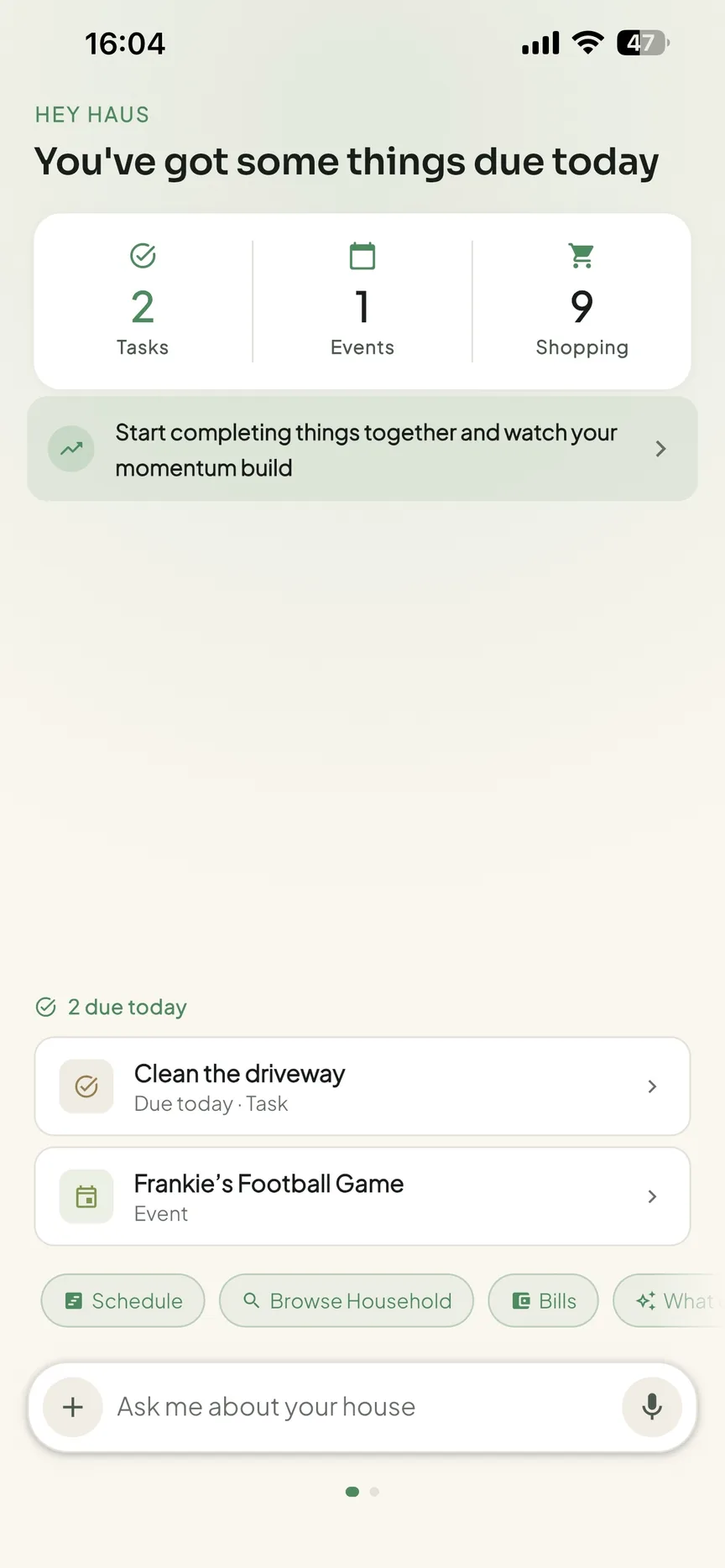
Tasks in OneHaus support recurring schedules and automatic rotation, so chores can be distributed fairly across household members without manual reassignment each week. The shared calendar syncs with Apple Calendar and Google Calendar. Shopping lists sync across devices and sort themselves by aisle to make the actual shop faster. The AI assistant lets you add tasks, shopping items, and calendar events using natural language rather than filling in forms. Home inventory lets you log appliances, vehicles, pets, warranties, and documents in one place.
OneHaus is available on iPhone, iPad, Apple Watch and Android, plus connected AI assistants. It is built with a privacy-first approach, keeping household data secure and not using it for advertising. OneHaus is free to download with a 30-day trial, after which a single household subscription covers everyone in the home.
Feature Comparison
| Feature | Homsy | OneHaus |
|---|---|---|
| Tasks and projects | Tasks with subtasks, priorities, due dates, assignees | Tasks with recurring schedules and rotation |
| Chore rotation | Smart Chores with daily/weekly/monthly rotation and streaks | Automatic rotation across household members |
| Shared calendar | Shared calendar with reminders | Shared household calendar |
| Calendar sync | Google Calendar and Apple Calendar | Apple Calendar and Google Calendar |
| Shopping lists | Real-time lists organised by category | Lists synced across devices, sorted by aisle |
| Recipes | Not available | Yes |
| Home inventory | Not available | Appliances, vehicles, pets, warranties, documents |
| Utility and bill tracking | Yes, with meter readings and usage charts | Not available |
| Trash collection schedule | Yes, colour-coded reminders | Not available |
| AI assistant | Not available | Natural language input and AI assistance |
| Offline-first | Yes | Online-first |
| Platforms | iOS, iPad, Mac, Apple Vision, Android | iPhone, iPad, Apple Watch, Android |
| Pricing | Free for households of up to 2 (capped at 10 tasks, 3 repeating chores, 2 lists, 3 notes, 5 recipes); Pro for 3+ from $5.99/mo or $79.99 lifetime | 30-day trial, then one household subscription |
Key Differences
AI and Natural Language Input
Homsy doesn't include AI features. Adding a task, event, or shopping item means filling in the relevant form with the details.
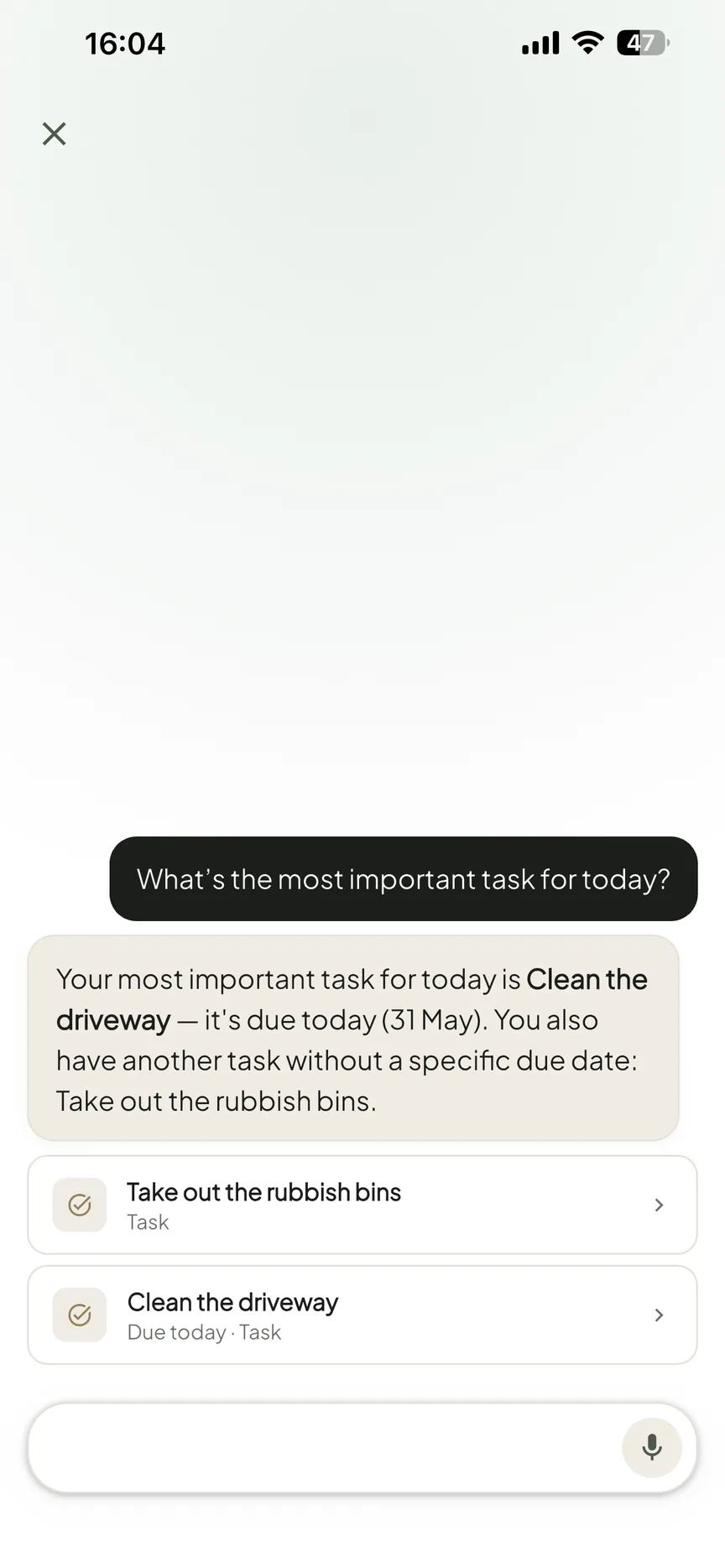
OneHaus includes a conversational AI assistant. You can describe what you need in plain language and the app handles the routing. Saying "add pasta to the shopping list" or "schedule a boiler service for next month" creates the relevant item without navigating menus. For households where capturing things quickly is what makes or breaks the habit, natural language input changes the day-to-day experience of using the app. In our own side-by-side testing, this was the clearest day-to-day gap: in Homsy every addition meant opening the right screen and filling in a form, where in OneHaus a single typed sentence did the same job.
Home Inventory vs Utility Tracking
The two apps invest in different parts of running a home. Homsy leans into the recurring running costs of a household: utility and bill tracking with meter readings and usage charts, plus a trash collection schedule. If you want to keep an eye on energy use and never miss bin day, that focus is useful.
OneHaus leans into the physical assets of a home instead. Home inventory lets you log appliances, vehicles, pets, warranties, and documents in one place, so the boiler warranty, the car service history, and the dog's records live alongside the app the household already uses. Homsy doesn't offer a home inventory of this kind.
Offline-First vs Connected and AI-Enabled
Homsy is offline-first by design, working without a connection and syncing later with end-to-end encryption. For households with patchy connectivity, or anyone who values local-first data, that is a genuine strength.
OneHaus takes a connected approach, which is what enables the AI assistant and access through connected AI assistants. The trade-off is that OneHaus expects a connection for its smartest features, where Homsy keeps working offline.
Platforms and Reach
Homsy spans the Apple ecosystem broadly, with iPhone, iPad, Mac on Apple Silicon, and Apple Vision, plus Android via Google Play. If your household mixes Apple and Android devices, Homsy covers both.
OneHaus is available on iPhone, iPad, Apple Watch and Android, and through connected AI assistants. Native apps mean every household member can use OneHaus on their own phone, and the AI assistant integration is a route Homsy doesn't offer.
Where Homsy Works Better
Homsy's offline-first design is a real differentiator. It keeps working without a connection and syncs when one returns, which suits households with unreliable internet or anyone who prefers their data to stay local first.
Utility and bill tracking is built in, with meter readings and usage charts for electricity, water, and gas. If keeping on top of household running costs matters to you, Homsy addresses that directly where OneHaus does not.
The trash collection schedule, with colour-coded pickup reminders, is a small but practical feature that many households genuinely need and few apps include.
Platform coverage is wider on the device front. Homsy runs across iPhone, iPad, Mac, and Apple Vision, and is on Android, so a mixed-device household is covered without compromise.
Price is a genuine strength for smaller households. A couple or roommate pair gets the app free, permanently, within the free plan's caps on tasks, chores, lists, notes and recipes. Larger households that do pay also get a lifetime option: at $79.99 once, Homsy Pro can work out cheaper over time than a recurring subscription for households that plan to stick with one app.
Where OneHaus Works Better
OneHaus covers parts of household management that Homsy doesn't attempt.
The AI assistant makes capturing things faster and lower-friction. For households where tasks and shopping items get forgotten because stopping to open an app and fill in a form feels like too much, natural language input changes that calculation. Homsy has no AI features.
Home inventory fills a gap Homsy leaves open. Logging appliances, vehicles, pets, warranties, and documents in one place, linked to the app the household already uses, removes the need for a separate filing system or scattered spreadsheets.
Recipes are built into OneHaus and tie into the shopping list, which Homsy doesn't offer.
Shopping lists in OneHaus sort by aisle, so the list is ordered the way you actually walk the shop rather than just grouped by category.
Access through connected AI assistants means OneHaus meets you where you already are, through an integration Homsy doesn't provide.
Who Should Choose Homsy
Homsy is a good fit for households that want a broad, offline-first organiser and care about tracking the running costs of the home. If you want chores, a calendar, shopping lists, and bill and utility tracking in one app, and you value an app that keeps working without a connection, Homsy is built for that.
It also suits mixed-device households that need both Apple and Android coverage, anyone who wants the niceties like a trash collection schedule, and households that would rather pay once for a lifetime licence than subscribe.
Who Should Choose OneHaus
OneHaus suits households that want AI assistance and home inventory alongside the usual chores, calendar, and shopping. If you'd rather add things by typing or speaking in plain language than filling in forms, and you want appliances, vehicles, pets, warranties, and documents tracked in the same app, OneHaus is designed for that.
It's also the better choice for households that want automatic chore rotation, aisle-sorted shopping, recipes tied to the list, and access from connected AI assistants, with a privacy-first approach and no advertising.
Frequently Asked Questions
Is Homsy free in 2026?
Yes, for smaller households, though with limits. The free plan covers up to 2 members with 10 active tasks, 3 repeating chores, 2 shopping lists, 3 notes and 5 recipes (checked September 2026). A paid Homsy Pro plan is only required once a household has 3 or more members, priced from $5.99 per month or $79.99 as a one-time lifetime purchase. OneHaus has a 30-day trial, after which one household subscription covers everyone.
Does Homsy have an AI assistant?
No. Homsy has no AI features, so adding a task, event, or shopping item means filling in the relevant form. OneHaus includes a natural-language AI assistant that creates tasks, shopping items, and calendar events from a typed or spoken sentence.
Does Homsy work offline?
Yes. Homsy is offline-first, working without a connection and syncing across devices later with end-to-end encryption. OneHaus takes a connected approach, which is what enables its AI assistant and access through connected AI assistants.
Does OneHaus or Homsy have home inventory?
Only OneHaus. It lets you log appliances, vehicles, pets, warranties, and documents in one place. Homsy instead focuses on running costs, with utility and bill tracking, meter readings, and a trash collection schedule, but it has no home inventory.
Try OneHaus Free
If you're looking for a Homsy alternative that adds an AI assistant, home inventory, and recipes on top of tasks, calendar, and shopping, give OneHaus a try. It's free to download on iPhone, iPad, Apple Watch and Android, with a 30-day trial and a single household subscription that covers everyone after that.