Best Home Maintenance Apps in 2026: Compared & Ranked
We compared the best home maintenance apps for 2026 on reminders, schedules, appliance and warranty tracking and pricing, so you can pick the right one fast.
Home & InventoryThe right home maintenance app depends on the job. If you want a maintenance schedule generated from your home's age and climate with a genuinely useful free tier, HomeBeacon is the easiest start. If you want appliance-aware reminders built from a quick scan of each nameplate, Homer is the cleanest pick on iPhone. If you want to run your home as an asset with inventory, budgets and projects alongside maintenance, HomeZada is the most complete. If you want the app to book a tradesperson for you, look at Oply. And if you want maintenance reminders tied to your home inventory and the tasks, calendar and shopping your household already runs every week, that is OneHaus.
Most apps that call themselves "home maintenance" fall into one of two camps. The first is reminder-only checklists: they generate a seasonal task list and ping you when the gutters are due. The second is pro and contractor tools that exist mainly to book a service or document a job. Both are useful, but few apps connect maintenance to your actual home inventory (the boiler, the car, the warranties) and to the household's shared tasks and calendar, so the reminder lands where someone will actually act on it. That gap is worth keeping in mind given the stakes: Bankrate's Hidden Costs of Homeownership study puts the average US home maintenance bill at $8,808 a year, the single largest hidden cost of owning a home. The right system stops that spending turning into emergencies. Pricing was last checked in June 2026.
Why "home maintenance" means two different things
When people search for a home maintenance app, they usually want one of two things, and the two are easy to confuse.
The first is a schedule. You want to know what needs doing and when: service the HVAC, bleed the radiators, clean the gutters, test the smoke alarms. A good schedule app builds this from your home's type, age and climate, then reminds you before each task is due. This is the most common kind of app, and the best ones make the list feel tailored rather than generic.
The second is a system of record. Appliances have warranties that lapse, vehicles have annual checks, documents go missing exactly when you need them. Here the value is in tracking the things you own and surfacing the right prompt at the right time, so a warranty does not expire silently and a service is not forgotten.
A schedule tells you what to do. An inventory tells you what you have. The hard part, and where the mental load actually lives, is connecting the two and then getting the reminder in front of whoever runs the home that week. Keep both jobs in mind as you read, because the best app for a pure schedule is not always the best app for keeping a household organised.
The apps
OneHaus
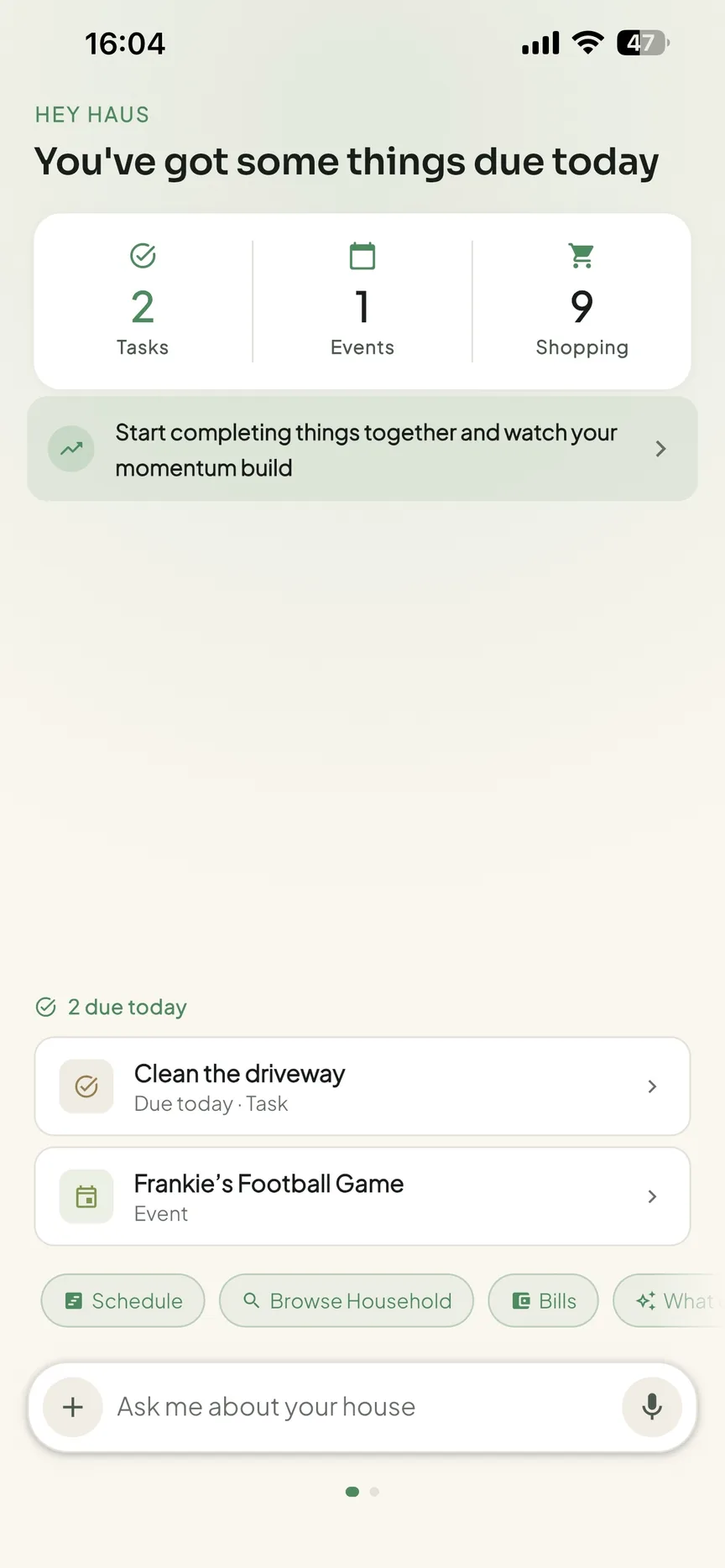
OneHaus is an AI-powered household management app that treats home maintenance as part of how a household runs, not as a separate checklist. Alongside its home inventory, it includes recurring tasks with automatic rotation, a shared calendar that syncs with Apple Calendar and Google Calendar, shared aisle-sorted shopping lists and recipes.
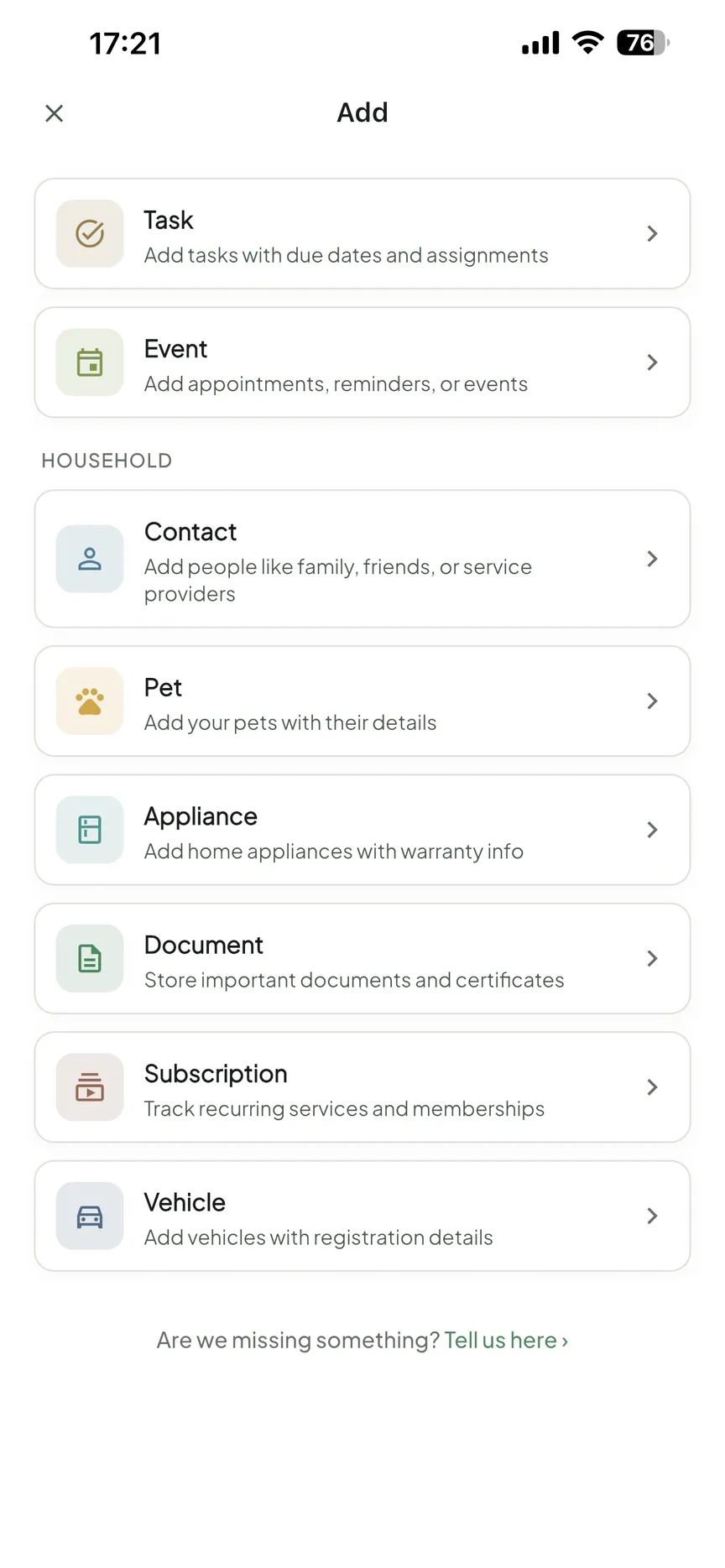
For maintenance specifically, the home inventory lets you log appliances, vehicles, pets, warranties and important documents, each with expiry and maintenance dates. When a service is due or a warranty is about to lapse, the reminder becomes a shared task the whole household can see, rather than a notification that pings one phone and gets dismissed. The AI assistant lets you add items and reminders in natural language, so you can say "log the new boiler, service due every October, warranty expires 2031" without working through a form.
The trade-off is that OneHaus is not a contractor marketplace and does not generate a pre-built seasonal schedule from your postcode the way a dedicated maintenance app does; you set up the recurring tasks and reminders that matter to you. It runs on iPhone, iPad, Apple Watch and Android, and through connected AI assistants. It is privacy-first and ad-free. It is free to download, with a 30-day trial and then a single household subscription that covers everyone.
Best for: households that want maintenance reminders to live alongside the tasks, calendar and shopping they already share, not in a standalone app.
HomeBeacon
HomeBeacon is purpose-built for home maintenance. It generates a personalised schedule based on your home's type, age and climate zone, then reminds you before each task is due, covering HVAC, plumbing, roofing, electrical, exterior and landscaping. It includes an equipment tracker, an equipment scanner that reads an appliance label to detect make, model and serial number, a maintenance history log for warranty claims and resale, and an AI assistant for maintenance questions. There is a home health score to show status at a glance.
Its standout is the free tier, a "Free Forever" plan that covers your first property with seasonal checklists, reminders and history, which App Store reviewers describe as genuinely useful rather than a stripped-back demo. Paid tiers add multi-property support, with premium features reported from around $4.99/month (HomeBeacon, checked June 2026). It is available on iOS, Android and a web dashboard. The limit is scope: it is a maintenance tool, so it does not carry the wider household features like a shared calendar, shopping or recipes.
Best for: homeowners who want a tailored maintenance schedule with a free option, especially across one to a few properties.
Homer
Homer is an iPhone-first home management app and the cleanest of the appliance-scanning options now that Centriq is gone. Point the camera at an appliance nameplate and it reads the make, model and serial number, then pulls the owner's manual and warranty terms and builds a per-appliance maintenance schedule that reminds you when filters, batteries and service intervals are due. It also stores receipts, manuals and documents, tracks a home inventory, and includes an AI assistant you can ask maintenance and troubleshooting questions. It is available on iPhone, iPad, Mac and Apple Vision, with a free tier and in-app purchases reported from around $4.99, plus an extra charge to add more than one home (Homer on the App Store, checked June 2026). The trade-offs: it is firmly in the Apple ecosystem (the Android and web experiences are thin), and per-property pricing stacks if you own more than one home.
Best for: iPhone households that want appliance-aware reminders built from a quick scan, rather than a generic seasonal list.
HomeZada
HomeZada is the broadest home management platform here. It combines maintenance schedules with home inventory, renovation and project budgets, property value and financial tracking, and an AI assistant called Zada AI that can assess maintenance needs and estimate item values from photos. It builds a starter maintenance calendar from your home's location, climate and systems at signup, then lets you adjust the cadence per task, with reminders by email and in-app.
That breadth is the strength and the cost. The Essentials plan is free and covers home inventory, documents and limited AI for one property. Premium is $99/year (or $15.95/month) and adds the full maintenance, projects and finance tools for one property, and Deluxe is $189/year for up to three properties (HomeZada pricing, checked June 2026). Reviewers consistently note a learning curve, and if you only want maintenance reminders, much of the financial and project depth goes unused. It is available on iPhone, iPad, Android and web.
Best for: homeowners who want to manage the home as an asset, with maintenance, inventory, projects and budgets in one place.
Oply
Oply is an AI-powered home management platform built around getting work done rather than just reminding you. You can upload a home inspection report and Oply surfaces the top issues, then offers one-tap booking of pre-screened local pros, payment and a running history of every repair and upgrade for resale, insurance or tax purposes. Its AI focuses on predictive maintenance, flagging issues before they become expensive.
Downloading and browsing is free, and homeowners pay when they book services, with optional subscription features noted as coming soon (Oply, checked June 2026). It is available on iOS and Android. The natural limits: it is oriented around a single primary residence and a US service network, so the booking side is most useful if you are in an area Oply's pros cover, and it is less of a fit if you mainly want to track and schedule things yourself.
Best for: homeowners who want maintenance issues identified and a tradesperson booked in a few taps.
Dwellin
Dwellin is a lighter, consumer-focused option that builds a smart home profile from publicly available property data, then generates maintenance guidance for what to expect as the home ages. It stores manuals, warranties, service contacts and history in a digital home binder, shows estimated maintenance costs, and uses AI to find and link your appliances' owner manuals automatically. A distinctive twist is a rewards programme: you earn points for the upkeep you already do, with an optional Premium membership that accelerates earning (Dwellin on the App Store, checked June 2026). It is available on iOS and Android. As a lighter app, it does not offer the financial and project depth of HomeZada or the wider household tools of a shared family app.
Best for: a simple maintenance binder and reminders, with rewards for staying on top of upkeep.
A note on Centriq: it was a well-regarded app for scanning appliance labels to pull up manuals, warranties and recall alerts, but Centriq Technology told users the platform would "cease operations as of January 31, 2026", and every version was retired on that date (AlternativeTo, checked September 2026). If you arrived here looking for a Centriq replacement, HomeBeacon and HomeZada are the closest current options.
Feature comparison
| Feature | OneHaus | HomeBeacon | Homer | HomeZada | Oply | Dwellin |
|---|---|---|---|---|---|---|
| Maintenance reminders | Yes | Yes | Yes | Yes | Yes | Yes |
| Pre-built seasonal schedule | Self-set recurring tasks | Yes, from home profile | Per appliance, from nameplate scan | Yes, from home profile | From inspection report | Yes, from property data |
| Appliance / warranty tracking | Yes | Yes | Yes, scan to capture | Yes | History log | Yes |
| Home inventory | Yes | Equipment only | Yes | Yes, full | Limited | Manuals & binder |
| Wider household tools (tasks, calendar, shopping) | Yes | No | No | No | No | No |
| Book a tradesperson | No | No | No | No | Yes | No |
| AI input | Natural language | AI assistant | AI assistant & manuals | Zada AI | Predictive AI | AI manuals |
| Platforms | iPhone, iPad, Apple Watch, Android, AI assistants | iOS, Android, web | iPhone, iPad, Mac, Vision | iPhone, iPad, Android, web | iOS, Android | iOS, Android |
| Pricing | Trial, then one household sub | Free tier, paid from ~$4.99/mo | Free tier, paid from ~$4.99 | Free tier, Premium $99/yr | Free, pay per booking | Free, optional Premium |
How to choose
Start from the job you actually need done.
If you want a tailored maintenance schedule without paying upfront, HomeBeacon has the most useful free tier and adapts tasks to your home's age and climate. If you are on iPhone and want reminders built straight from your appliances, Homer scans each nameplate to pull the manual and warranty and schedule the upkeep. If you think of your home as an asset and want inventory, projects and budgets together with maintenance, HomeZada is the most complete, as long as you are happy with its depth and learning curve. If the real friction is finding and booking someone to do the work, Oply is built for that. And if you want a light maintenance binder with a rewards angle, Dwellin fits.
If the goal is keeping the whole home running, where maintenance reminders need to connect to the tasks, calendar and shopping the household already shares, a dedicated maintenance app leaves a gap: the reminder lives in an app only one person opens. That is where OneHaus fits. Warranties, appliances, vehicles and documents are tracked in the same place you manage chores and the week, and a due service or expiring warranty becomes a shared task everyone can see. You can also see how it compares to specific apps on the comparisons page.
Frequently asked questions
What is the best home maintenance app?
It depends on what you need. For a free, tailored maintenance schedule, HomeBeacon is the easiest start. For appliance-aware reminders from a quick nameplate scan on iPhone, Homer is the cleanest. For inventory, projects and budgets alongside maintenance, HomeZada is the most complete. For booking a tradesperson, Oply. And if you want maintenance reminders connected to the tasks, calendar and shopping your household already runs, OneHaus folds them into one shared app.
Is there a free home maintenance app?
Yes. HomeBeacon has a "Free Forever" plan covering one property with checklists, reminders and history. HomeZada's Essentials plan is free for home inventory and documents on one property, though maintenance and project tools need a paid plan. Oply is free to download and you pay when you book a service. OneHaus is free to download with a 30-day trial, then a single household subscription that covers everyone.
What home maintenance should I track?
At a minimum, track recurring jobs by season (HVAC service, smoke alarm tests, gutter cleaning, radiator and filter checks) and the things you own that have a service interval or expiry: appliances and their warranties, the boiler's service date, and vehicle checks. Logging warranty expiry dates and service history turns a simple reminder list into a record that also helps with claims and resale.
What is the difference between a home maintenance app and a home inventory app?
A maintenance app focuses on what needs doing and when, usually a schedule with reminders. A home inventory app focuses on what you own and what it is worth, often for insurance. The most useful setup connects both, so a warranty expiry or service date on an item you own becomes a maintenance prompt. For the cataloguing side specifically, see our guide to the best home inventory apps.
Can a home maintenance reminder become a shared task?
In most dedicated maintenance apps the reminder is a personal notification on one device. In OneHaus, a due service or an expiring warranty surfaces as a shared task the whole household can see and pick up, which matters when more than one person keeps the home running. That shared visibility is the main reason to keep maintenance in the same place as your tasks and calendar.
Which to pick
With maintenance now the biggest hidden cost of owning a home, the app that pays off is the one whose reminders you actually act on. A dedicated tool like HomeBeacon, Homer or HomeZada wins if maintenance lives in its own app and one person owns it. But if the point is to keep your home maintained as part of how the household actually runs, the reminder needs to land where the work gets shared out. That is the gap OneHaus closes: warranties, appliances and reminders sit next to the tasks and calendar everyone already shares, so a due service becomes a job someone picks up rather than a notification one person dismisses. For how that fits a busy household, see the OneHaus for families page, or browse the household app comparisons. You can also compare the cataloguing side with the best home inventory apps, or see the wider picture in our best household management apps roundup.
Try OneHaus free on iPhone, iPad, Apple Watch and Android.